
Using Sequence Command to Construct Polygons and Geometric Objects
Loading the math board and drawing, please wait…
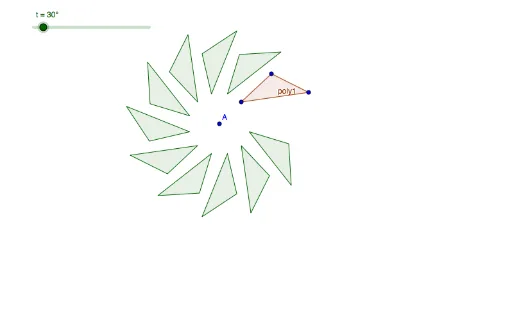
This GeoGebra example illustrates how to use the Sequence command to efficiently generate a collection of geometric objects, such as polygons, segments, and points, creating dynamic and repeatable constructions. The core mathematical concepts covered include sequences and series, polygon properties, isosceles triangles, sine functions, planes, least common multiple (LCM) and greatest common divisor (GCD), and quadratic equations. The construction employs the Polygon command to define a base polygon (poly1) and the Sequence command with parameters (t, r, n) to produce a list (list1), which controls the placement of points or the repetition of shapes. Key objects include A, B, C, D and side lengths d, b, c. This example is ideal for middle and high school mathematics teachers to demonstrate the power of sequences in geometric construction, and for students to explore how algorithmic thinking can simplify complex drawings. It is particularly useful for lessons on sequences, geometric transformations, and dynamic mathematics.
GeoGebra Commands & Parameters
Polygon(B, C, D) → poly1, d, b, cSequence(Polygon[Rotate[B, (k * t), A], Rotate[C, (k * t), A], Rotate[D, (k * t), A]], k, 1, 10) → list1
AI Drawing Prompt Reference
Draw a dynamic geometric figure composed of a series of isosceles triangles. Start with an initial triangle, then add rotated and repeated triangles to create a continuous pattern. The size and position of the triangles will change with parameters. Include points A, B, C, D and corresponding side lengths. The construction order begins with the initial triangle and then adds rotated triangles to form a coherent geometric pattern.
The prompt above was compiled from the original drawing commands and is for reference only.