
Using Riemann Sums to Approximate Area Under a Curve
Loading the math board and drawing, please wait…
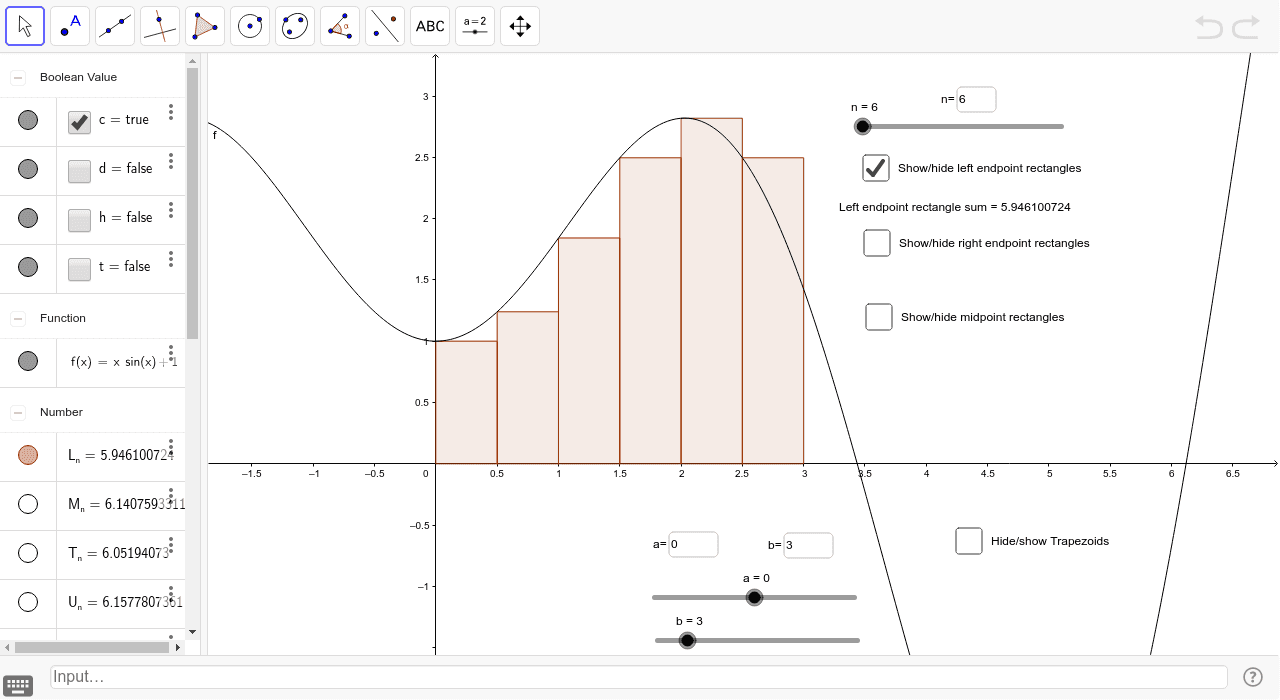
This example demonstrates how to approximate the area under a curve using Riemann sums. Key mathematical concepts include integration, Riemann sums, and rectangular/trapezoidal areas. Construction involves GeoGebra commands like Textfield, RectangleSum, TrapezoidalSum, LeftSum, and objects such as n, f, a, b, U_n, L_n, c, d, T_n, g, p, M_n, h, t, text4, text1, text2, text3, inputBox1, inputBox2, inputBox3. Suitable for high school students or college freshmen learning calculus basics.
GeoGebra Commands & Parameters
Textfield(a) → inputBox1Textfield(b) → inputBox2RectangleSum(f, a, b, n, 1) → U_nRectangleSum(f, a, b, n, 0) → L_nTrapezoidalSum(f, a, b, n) → T_nLeftSum(f, a, b, n) → gRectangleSum(f, a, b, n, p) → M_nTextfield(n) → inputBox3
AI Drawing Prompt Reference
Draw a function graph and show how to approximate the area under the curve using Riemann sums. Include left Riemann sum, right Riemann sum, trapezoidal sum, and midpoint Riemann sum, along with their corresponding area calculations. Set adjustable parameters n, a, b, and display these parameters and results using text fields.
The prompt above was compiled from the original drawing commands and is for reference only.