
Sine Area Function: Visualizing Cumulative Area via Integration
Loading the math board and drawing, please wait…
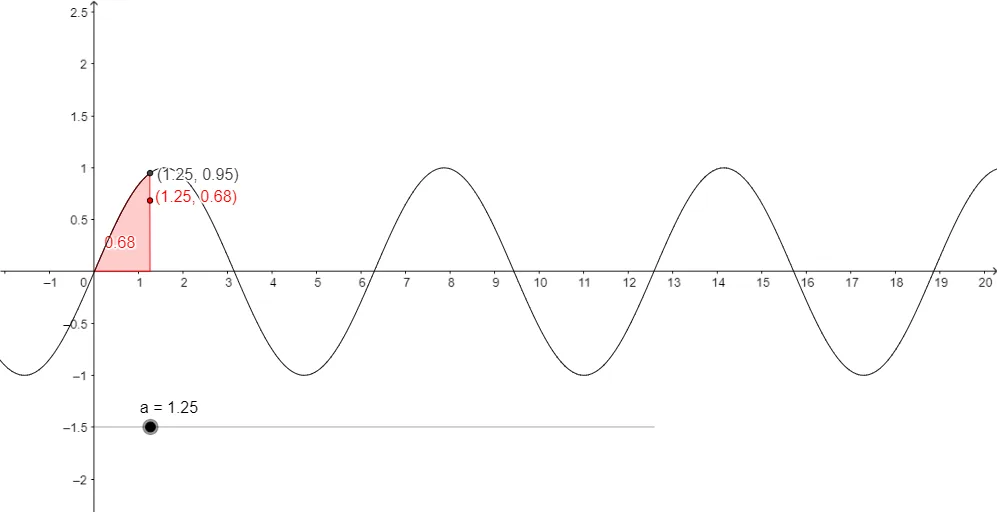
This example demonstrates how the “cumulative area” under a sine curve changes as the integration upper limit varies, producing a new function whose graph reflects the accumulated signed area. The core mathematical ideas are integral calculus (summing area through integration), trigonometry (the sine function’s periodicity and sign), and continuity (the resulting area function varies smoothly with the boundary). In the construction, a sine-related integrand f is defined, and integration bounds are specified using points/parameters a and b, with endpoints represented by objects P and Q to indicate where the interval starts and ends. GeoGebra’s Integral command is then used to create the area function from these objects, allowing learners to see how geometric area and analytic integration correspond. The provided construction summary highlights the key command and objects: Integral with f, a, P, b, and Q. Suitable for high school advanced math through early university calculus, especially for interactive function graphing and integral interpretation.
GeoGebra Commands & Parameters
Integral(f, 0, a) → b
AI Drawing Prompt Reference
Create a graph of a cumulative signed-area function defined by a definite integral under a sine-related integrand f. Use 0 as the lower integration limit and a as the variable upper limit. Treat the integral of f from 0 to a as the value of a new function, then plot this resulting function as a varies, showing how the accumulated area changes smoothly with the upper bound. Indicate the interval boundaries conceptually with an endpoint representing the start at 0 (P) and an endpoint representing the end at a (Q) to clarify where the integration starts and ends.
The prompt above was compiled from the original drawing commands and is for reference only.