
Unusual Values and Outliers
Loading the math board and drawing, please wait…
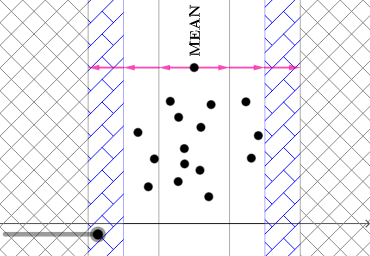
This example demonstrates how to identify and handle unusual values and outliers in data. Key mathematical concepts include standard deviation, mean, and variance in statistics. Using GeoGebra commands such as Variance, mean, stdev, etc., the distribution of data can be visually illustrated. Suitable for high school and above students or teachers for statistics education.
GeoGebra Commands & Parameters
Variance(l1) → amean(l1) → cPoint(eq1) → PCircle(P, b) → dIntersect(d, f, 1) → QIntersect(d, f, 2) → RVector(P, R) → uVector(P, Q) → vRotateText(text1, π / 2) → text2stdev(l1) → estdevp(l1) → gTranslate(P, ((-b), 0)) → P'Translate(P, ((-2 * b), 0)) → P'_{1}Translate(P, ((-3 * b), 0)) → P'_{2}Translate(P, ((2 * b), 0)) → P'_{3}Translate(P, ((3 * b), 0)) → P'_{4}Vector(P', P'_{1}) → wVector(P'_{1}, P'_{2}) → nTranslate(P, (b, 0)) → P'_{5}Vector(P'_{5}, P'_{3}) → pVector(P'_{3}, P'_{4}) → q
AI Drawing Prompt Reference
Create a data distribution diagram showing mean and standard deviation, with a circle indicating data range and highlighting outliers. Start by plotting data points, calculate mean and standard deviation, draw a circle centered at the mean, and mark intersection points as Q and R. Represent directions with vectors PQ and PR. Then move the mean point based on standard deviation to create several points, showing movement directions with vectors. Finally, add text labels for mean and standard deviation.
The prompt above was compiled from the original drawing commands and is for reference only.