
Open Middle Histogram Exercise (2)
Loading the math board and drawing, please wait…
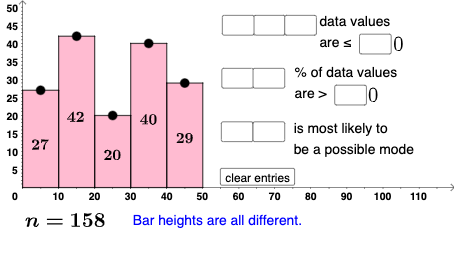
This example demonstrates how to generate and analyze histograms by adjusting data, covering core concepts like frequency distribution, statistical characteristics, set theory, rational numbers, parabolas, box plots, and binomial distributions. It utilizes GeoGebra commands like If, Sequence, IndexOf, Polygon, Textfield, Mode, Max, CountIf. Suitable for high school statistics education, focusing on data visualization and distribution analysis.
GeoGebra Commands & Parameters
If(u_1 ≟ 0, Sum[l2], u_1 ≟ 1, Sum[l2] - y(A), u_1 ≟ 2, Sum[l2] - y(A) - y(B), u_1 ≟ 3, y(D) + y(E), u_1 ≟ 4, y(E)) → newvSequence(Element[l2, i], i, 1, t_1, 1) → l5, ?If(t_1 ≤ 5, Sum[l5], Sum[l2]) → f_2IndexOf(Max[l2], l2) → b_2Polygon((0, 0), (10, 0), (10, y(A)), (0, y(A))) → q1, i, m, n, pPolygon((10, 0), (20, 0), (20, y(B)), (10, y(B))) → q2, q, r, s, tPolygon((20, 0), (30, 0), (30, y(C)), (20, y(C))) → q3, f_1, g_1, h_1, i_1Polygon((30, 0), (40, 0), (40, y(D)), (30, y(D))) → q4, j_1, k_1, l_1, m_1Polygon((40, 0), (50, 0), (50, y(E)), (40, y(E))) → q5, n_1, p_1, q_1, r_1Textfield(b_1) → InputBox1Textfield(c_1) → InputBox2Textfield(d_1) → InputBox3Textfield(e_1) → InputBox4Textfield(o_1) → InputBox5Textfield(s_1) → InputBox6Textfield(t_1) → InputBox7Textfield(u_1) → InputBox8Mode(l2) → l3Max(l2) → a_2CountIf(x ≟ Max[l2], l2) → w_1If(Length[l3] ≟ 0, "Bar heights are all different.", "Some bar heights are the same.") → text10If(cc1, "√", "X") → text11If(cc2, "√", "X") → text12If(cc3 ≟ true, "√", "X") → text13If(Length[Mode[l4]] ≟ 0, "No digits repeat!", "Some digits repeat.") → text14CountIf(x ≟ Max[l2], l2) → d_2IndexOf(Max[l2], l2, b_2 + 1) → b_3IndexOf(Max[l2], l2, b_3 + 1) → b_4IndexOf(Max[l2], l2, b_4 + 1) → b_5IndexOf(Max[l2], l2, b_5 + 1) → b_6Textfield(e_2) → InputBox9
AI Drawing Prompt Reference
Draw a histogram with five rectangles of different heights representing five data groups. First, draw five rectangles with bases on the x-axis and heights y(A), y(B), y(C), y(D), and y(E). Then, display the height of each rectangle above the x-axis and show the height and frequency of the tallest rectangle below. Finally, display the mode and maximum value of the data groups.
The prompt above was compiled from the original drawing commands and is for reference only.