
Ultimate Symmetry in 3D Sphere
Loading the math board and drawing, please wait…
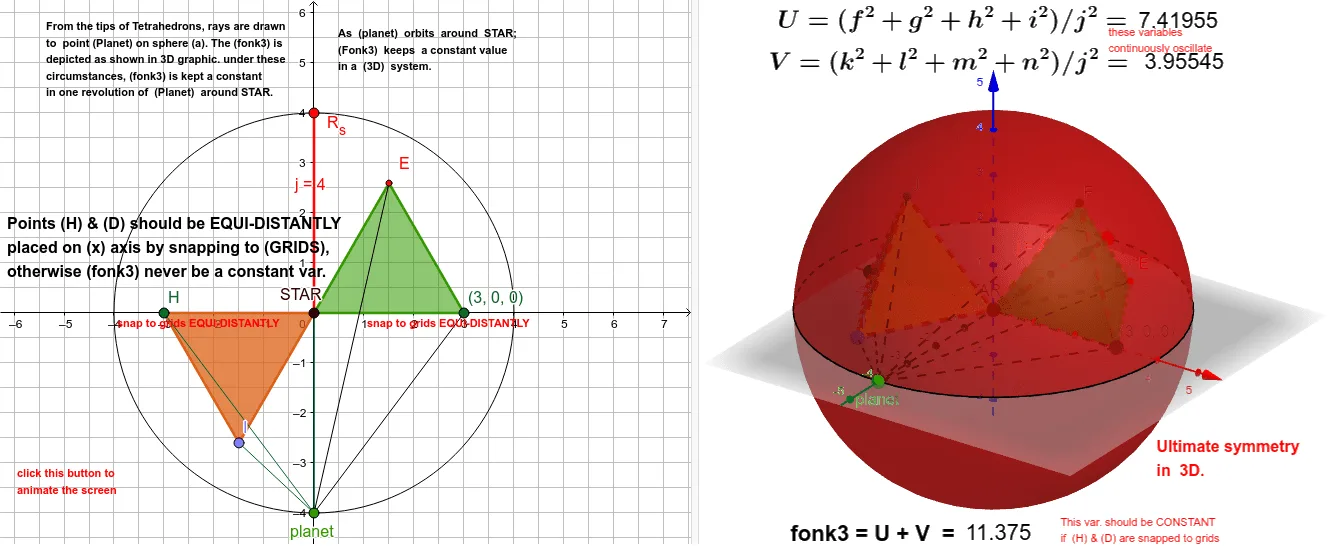
This example demonstrates the ultimate symmetry of a 3D sphere. It involves the geometric properties and symmetry transformations of a sphere. Using GeoGebra commands such as Point, Segment, Sphere, and Tetrahedron, the symmetrical planes and axes of the sphere can be constructed. Suitable for high school geometry and solid geometry courses.
GeoGebra Commands & Parameters
Point(xAxis) → DPoint(xAxis) → STARSegment(STAR, R_s) → jSphere(STAR, R_s) → aTetrahedron(STAR, D, xOyPlane) → b, E, edgeAF, edgeEF, edgeDF, F, faceADE, faceAEF, faceADF, faceDEF, edgeAE, edgeAD, edgeDECircle(STAR, R_s, xOyPlane) → cPoint(c) → planetSegment(E, planet) → gSegment(D, planet) → hSegment(F, planet) → iPoint(xAxis) → HPoint(Circle[Midpoint[STAR, H], (Distance[STAR, H] * sqrt(3) / 2), Segment[STAR, H]]) → ITetrahedron(STAR, H, I) → d, J, edgeIJ, edgeHJ, faceHISTAR, faceIJSTAR, faceHJSTAR, faceHIJ, edgeISTAR, edgeHSTAR, edgeHI, edgeJSTARSegment(STAR, planet) → fSegment(I, planet) → kSegment(H, planet) → lSegment(J, planet) → mSegment(STAR, planet) → n
AI Drawing Prompt Reference
Draw a 3D sphere with its center on the x-axishol. Place a moving point on the sphere's surface. Construct a regular tetrahedron with one vertex at the sphere's center and its base on the horizontal plane, drawing all its edges. Then take another point on the x-axis beyond the center, form a segment with the center, and construct a second tetrahedron using this segment as an axis, with vertices at the center and near that point. Finally, connect the center and all tetrahedron vertices to the moving point on the sphere with straight segments, illustrating the sphere's symmetry.
The prompt above was compiled from the original drawing commands and is for reference only.