
Two Tangents from an External Point to a Circle
Loading the math board and drawing, please wait…
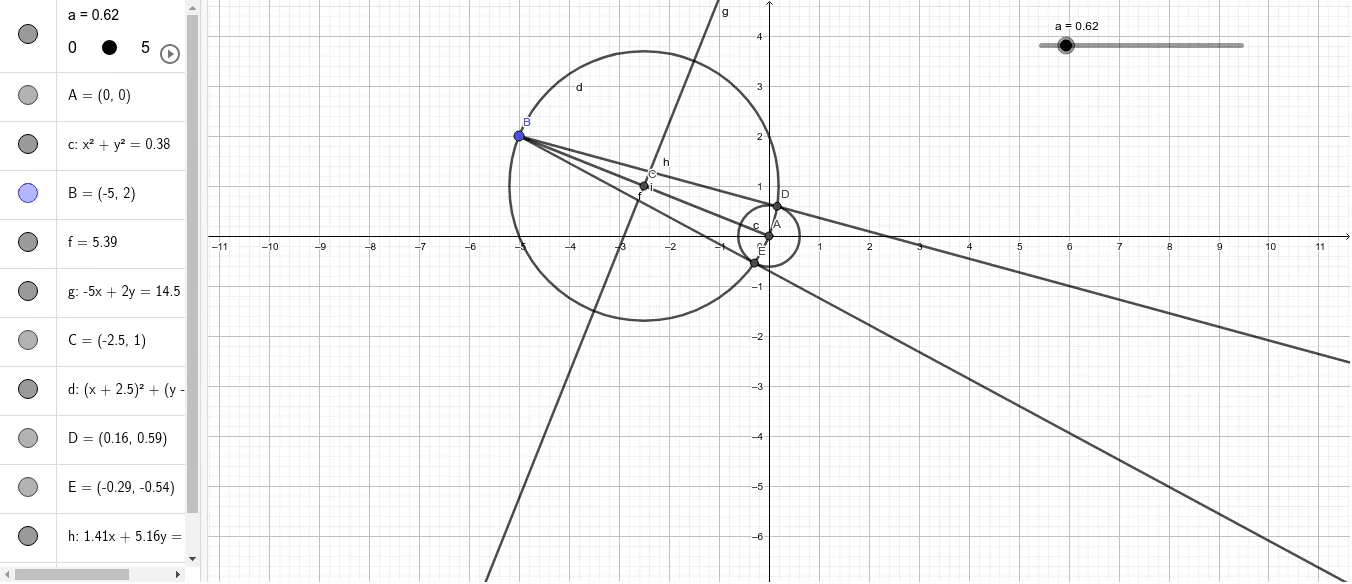
This example demonstrates the two tangents from a point outside a circle. Key mathematical concepts include tangents, circle properties, and geometric construction. It uses commands like Intersect, Circle, Segment, LineBisector, and Ray in GeoGebra.
GeoGebra Commands & Parameters
Intersect(xAxis, yAxis) → ACircle(A, a) → cSegment(B, A) → fLineBisector(B, A) → gIntersect(f, g) → CCircle(C, B) → dIntersect(d, c) → D, E, ,Ray(B, D) → hRay(B, E) → i
AI Drawing Prompt Reference
Draw a circle centered at the origin with arbitrary radius. Place a point outside the circle. Connect this external point to the center, then construct the perpendicular bisector of this segment, intersecting it at its midpoint. Using this midpoint as center and the distance to the external point as radius, draw another circle that intersects the original circle at two points. From the external point, draw two rays to these intersection points; these rays are the two tangents from the external point to the circle.
The prompt above was compiled from the original drawing commands and is for reference only.