
Two Angles and an Included Side Discovery
Loading the math board and drawing, please wait…
In collections
Triangle Congruence
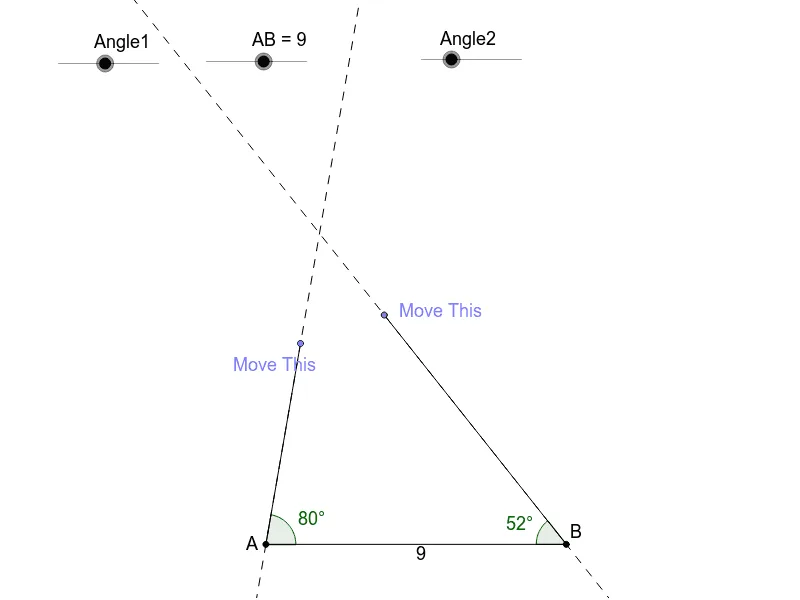
① This example demonstrates how, given two angles and their included side (ASA), students can move endpoints on the angles to determine how many unique triangles can be created. ② The core mathematical concepts are the ASA (Angle-Side-Angle) triangle congruence criterion and the triangle angle sum property, emphasizing that fixing two angles and the included side yields a unique triangle. ③ Construction details: Using GeoGebra commands such as Point, Segment, Rotate, Angle, Line, Intersect, and Polygon, the applet creates angle objects Angle1 and Angle2, segment AB as the included side, rotates rays to form the angles, finds the third vertex via intersection, and constructs polygon poly1, with auxiliary objects like a, b, c. ④ This is suitable for middle school geometry lessons or exploratory activities, helping students intuitively understand triangle congruence conditions and develop dynamic geometric reasoning.
GeoGebra Commands & Parameters
Point(Circle[A, abs(AB)]) → BSegment(A, B) → aRotate(B, Angle1, A) → B'Angle(B, A, B') → αLine(A, B') → bRotate(A, (-Angle2), B) → A'Angle(A', B, A) → βLine(A', B) → cPoint(b) → CSegment(A, C) → dPoint(c) → DSegment(B, D) → eIntersect(b, c) → EPolygon(A, E, B) → poly1, b_1, a_2, e_1Segment(C, D) → f
AI Drawing Prompt Reference
Draw a triangle with a fixed included angle between two sides of adjustable length. Start with a horizontal base segment. From its left endpoint, rotate a ray upward by a given angle; from its right endpoint, rotate another ray inward by another given angle. The two rays intersect at the third vertex. Connect the three vertices to form the triangle. Additionally, place a movable point on each ray and connect them with a segment to observe how the triangle changes.
The prompt above was compiled from the original drawing commands and is for reference only.