
Side-Angle-Side Triangle Construction Discovery
Loading the math board and drawing, please wait…
In collections
Triangle Congruence
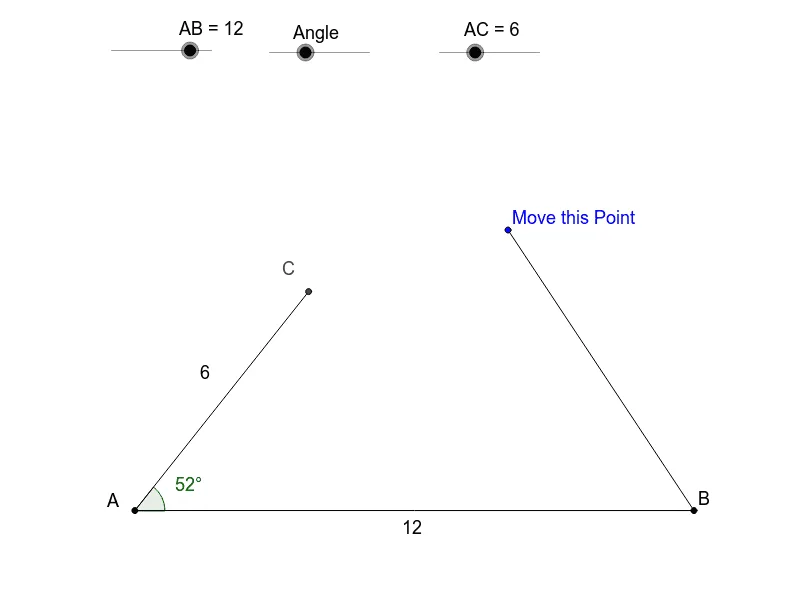
This example allows students to set two sides and an included angle to explore how many unique triangles can be formed, demonstrating the SAS triangle congruence criterion. It involves core concepts like geometric constructions, vectors, and coordinate geometry. Students use commands such as Point, Segment, Rotate, Angle, Line, Circle, Intersect, and Polygon to create and manipulate shapes. Ideal for middle school and above to understand triangle properties and geometric transformations.
GeoGebra Commands & Parameters
Point(Circle[A, abs(AB)]) → BSegment(A, B) → aRotate(B, Angle, A) → B'Angle(B, A, B') → αLine(A, B') → bCircle(A, AC) → cIntersect(c, b) → E, CSegment(A, C) → dSegment(B, D) → eSegment(C, D) → fPolygon(A, C, B) → poly1, b_1, a_2, c_1Angle(poly1) → β, γ, δ
AI Drawing Prompt Reference
Draw a triangle by setting two sides and their included angle to explore different triangle formations and verify the SAS congruence criterion. Start by drawing two line segments as sides, then rotate one side according to the given angle to locate the third vertex. Complete the triangle by drawing the third side and finding the intersection points with a circle. Finally, measure and display all the angles.
The prompt above was compiled from the original drawing commands and is for reference only.