
Side-Side-Angle (SSA) Discovery: Adjust Two Sides and the Angle
Loading the math board and drawing, please wait…
In collections
Triangle Congruence
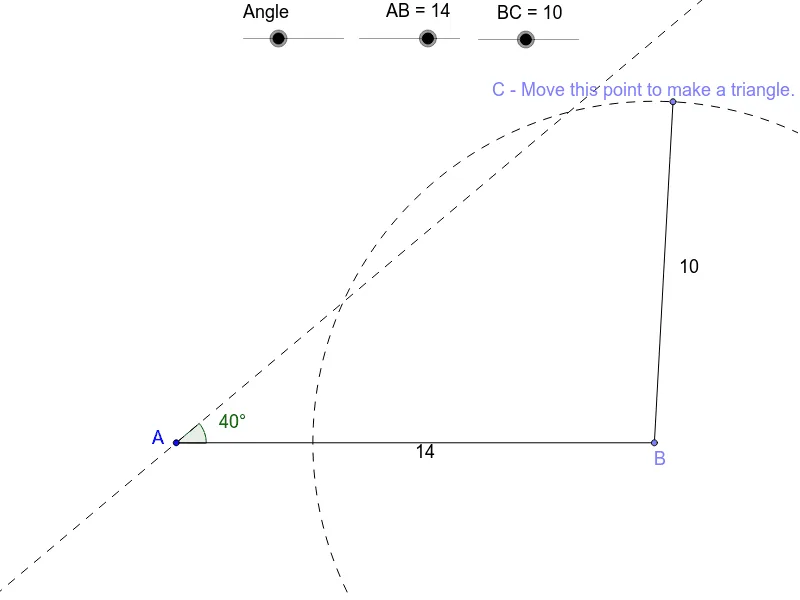
This interactive GeoGebra example dynamically adjusts two side lengths and the included angle to explore the ambiguous case of the Side-Side-Angle (SSA) condition in triangle construction. It demonstrates that given two sides and a non-included angle, the triangle is not uniquely determined—two possible triangles may arise. Core mathematical concepts include triangle congruence and similarity criteria, specifically the SSA ambiguity. The construction uses GeoGebra commands such as Point, Segment, Rotate, Angle, Line, Circle, Intersect, and Polygon. It builds fixed side AB, rotates side BC by angle α, and uses circle-line intersections to generate candidate vertices C1 and C, producing two possible triangles poly1 and poly2, with additional angles β, γ, δ displayed. This resource is ideal for high school geometry lessons or exploratory activities, helping students understand the limitations of SSA and fostering dynamic geometric reasoning.
GeoGebra Commands & Parameters
Point(Circle[A, abs(AB)]) → BSegment(A, B) → dRotate(B, b, A) → B'Angle(B, A, B') → αLine(A, B') → eCircle(B, BC) → fIntersect(f, e) → C1, DSegment(D, B) → gSegment(C1, B) → hSegment(A, D) → iPoint(f) → CSegment(B, C) → jSegment(C1, C) → kSegment(D, C) → lPolygon(A, C1, B) → poly1, b_1, a_1, c1Angle(poly1) → β, γ, δPolygon(A, D, B) → poly2, b_2, a_2, d_2Angle(poly2) → ε, ζ, η