
Tutorial on Designing Interactivity in the Time Line Tool
Loading the math board and drawing, please wait…
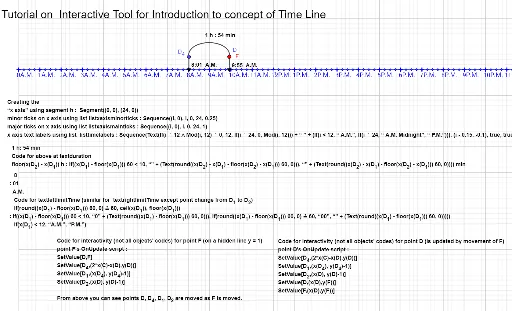
This tutorial demonstrates how to use the Interactive Time Line Tool to create interactive content. It shows the logic and script behind the interactivity. Using commands like CircleArc, Segment, Point, Sequence, Line, etc., dynamic mathematical models can be constructed. Suitable for math teachers and students learning interactive math construction.
GeoGebra Commands & Parameters
CircleArc(C, D, D_4) → cSegment(D_4, D_1) → fSegment(D_2, D) → gPoint(c) → ASequence(Text[If[i ≟ 12 ∧ Mod[i, 12] ≟ 0, 12, If[i ≟ 24, 0, Mod[i, 12]]] + " " + (If[i < 12, " A.M.", If[i ≟ 24, " A.M. Midnight", " P.M."]]), (i - 0.15, -0.1), true, true], i, 0, 24, 1) → listtimelabelsSequence((i, 0), i, 0, 24, 1) → listxaxismainticksSequence((i, 0), i, 0, 24, 0.25) → listxaxisminorticksSegment((0, 0), (24, 0)) → hLine(B, E) → iPoint(i) → F