
Trig Identity via Areas: Dynamic Illustrator
Loading the math board and drawing, please wait…
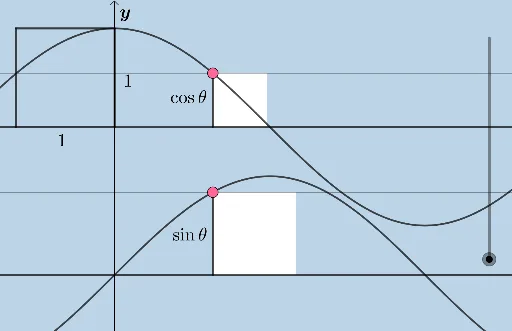
①This example dynamically illustrates trigonometric identities (such as those related to the Pythagorean theorem) by comparing areas within a unit circle and right triangles, making the algebraic identity visually evident. ②Core mathematical concepts include trigonometric functions, Pythagorean theorem, unit circle, area equivalence, similar triangles, and geometric transformations. ③Construction highlights: using GeoGebra commands such as Line, Intersect, Polygon, Circle, Segment, Dilate, Translate, OrthogonalLine, Vector, Point, Angle, and Rotate, the applet builds interactive figures with circles, lines, polygons, vectors, angles, and multiple auxiliary points; dragging sliders or points changes the angle and updates area relationships in real time. ④Suitable for high school or early college students learning trigonometric identities, and for teachers creating dynamic geometry demonstrations that connect algebra and geometry.
GeoGebra Commands & Parameters
Line(A, B) → hIntersect(h, xAxis) → CPolygon(A, C, 4) → poly1, i, j, k, l, D, EIntersect(h, p) → FPolygon(B, F, 4) → poly2, m, n, q, r, G, HIntersect(xAxis, yAxis) → IIntersect(f, yAxis, (0, 1)) → JPolygon(I, J, 4) → poly3, s, t, c, d, K, LCircle(C, 1) → c_1Intersect(c_1, f_1) → M, NSegment(C, N) → g_1Dilate(A, If[0 < e ≤ 1, 1 - e, 0], N) → A'Translate(E, Vector[A, A']) → E'Polygon(C, A', E', D) → q1, c_2, a', e', d_2OrthogonalLine(C, e') → h_1Line(E', D) → i_1Intersect(h_1, i_1) → ODilate(D, If[2 < e ≤ 3, 3 - e, 0], O) → D'Translate(E', Vector[D, D']) → E''Polygon(A', E'', D', C) → q2, j_1, e'', d', c_3Segment(I, J) → k_1Segment(J, K) → l_1Segment(K, L) → m_1Segment(L, I) → n_1Segment(A, E) → p_1Segment(E, D) → q_1Segment(D, C) → r_1Segment(C, A) → s_1Segment(A', E') → t_1Segment(E', D) → a_1Segment(D, C) → b_1Segment(C, A') → d_1Segment(A', E'') → e_1Segment(E', D') → f_2Segment(C, D') → g_2Dilate(C, If[4 < e ≤ 5, 5 - e, 0], K) → C'Vector(C, C') → uTranslate(A', u) → A''Translate(E'', u) → E'''Translate(D', u) → D''Translate(C, u) → C'_1Polygon(A'', E''', D'', C'_1) → q2', a'', e''', d'', c'_1Line(C', m_1) → h_2Point(h_2) → PAngle(P, C', D'') → αRotate(A'', If[4 < e ≤ 5, ((-(e - 4)) * α), (-α)], C'_1) → A'''Rotate(E''', If[4 < e ≤ 5, ((-(e - 4)) * α), (-α)], C'_1) → QRotate(D'', If[4 < e ≤ 5, ((-(e - 4)) * α), (-α)], C'_1) → D'''Rotate(C'_1, If[4 < e ≤ 5, ((-(e - 4)) * α), (-α)], C'_1) → RPolygon(A''', Q, D''', R) → q2'', a''', q_2, d''', r_2Line(C, A') → i_2Line(D, E') → j_2Line(B, H) → k_2Segment(B, H) → m_2Segment(H, G) → n_2Segment(G, F) → s_2Circle(F, 1) → e_2Intersect(e_2, k_2) → S, TDilate(B, If[6 < e ≤ 7, 7 - e, 0], T) → B'Vector(B, B') → vTranslate(H, v) → H'Polygon(F, B', H', G) → q3, f_3, b', h', g_3OrthogonalLine(F, h') → t_2Line(H', G) → a_2Intersect(t_2, a_2) → UDilate(G, If[8 < e ≤ 9, 9 - e, 0], U) → G'Vector(G, G') → wTranslate(H', w) → H''Polygon(F, B', H'', G') → q4, f_4, b_2, h'', g'Line(B', F) → h_3Dilate(U, If[10 < e ≤ 11, 11 - e, 0], L) → F'Vector(U, F') → u_1Translate(F, u_1) → F'_1Translate(B', u_1) → B''Translate(H'', u_1) → H'''Translate(G', u_1) → G''Polygon(F'_1, B'', H''', G'') → q4', f'_1, b'', h''', g''Rotate(F'_1, If[10 < e ≤ 11, ((-(e - 10)) * (π / 2 - α)), α - π / 2], G'') → VRotate(B'', If[10 < e ≤ 11, ((-(e - 10)) * (π / 2 - α)), α - π / 2], G'') → B'''Rotate(H''', If[10 < e ≤ 11, ((-(e - 10)) * (π / 2 - α)), α - π / 2], G'') → WRotate(G'', If[10 < e ≤ 11, ((-(e - 10)) * (π / 2 - α)), α - π / 2], G'') → G'''Polygon(V, B''', W, G''') → q4'', v_1, b''', w_1, g'''Segment(A, Z) → i_3Segment(B, F) → l_2
AI Drawing Prompt Reference
Draw a unit circle with a triangle inside and a right triangle, comparing their areas to illustrate trigonometric identities. Start by drawing a unit circle and two intersecting lines, then construct four polygons to represent area relationships. Use similar triangles and geometric transformations (such as translation, rotation, and scaling) to dynamically show how angle changes affect area. Finally, rotate and scale the elements to ensure they fit the geometric interpretation of trigonometric identities.
The prompt above was compiled from the original drawing commands and is for reference only.