
Triangle Rotation to Conic Sections Animation
Loading the math board and drawing, please wait…
In collections
CCSS High School: Geometry (Congruence) Volume 2
CCSS High School: Geometry (Congruence) Volume 2
CCSS High School: Geometry (Congruence) Volume 2
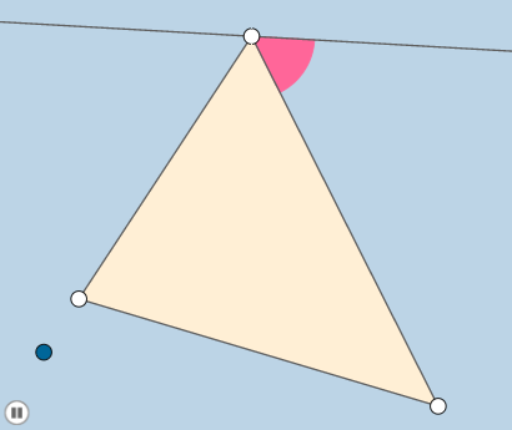
This example demonstrates the generation of conic sections through the rotation of an equilateral triangle, visually linking geometric transformations with analytical geometry. Core concepts include equilateral triangle construction, rotation transformations, formation of conic sections (ellipse, parabola, hyperbola), linear functions, and confidence intervals. Key GeoGebra commands and objects used are Rotate, Polygon, Circle, Intersect, and Dilate. Suitable for high school and above learners to understand geometric transformations in analytical geometry and the principles of conic section generation.
GeoGebra Commands & Parameters
Rotate(A, 60°, B) → A'Angle(A, B, A') → αRay(B, A) → fRay(B, A') → gPoint(f) → CPoint(g) → DPolygon(C, D, B) → poly1, b, c, dRotate(D, 60°, B) → D'Angle(D, B, D') → βRotate(C, (-(60°)), B) → C'Angle(C', B, C) → γLine(C', D') → hSegment(B, C) → iSegment(B, D) → jMin(i, j) → aSegment(C, D) → kMin(i, k) → lMin(a, l) → mCircle(B, (0.2 * m)) → eIntersect(e, h, 1) → EIntersect(e, i, 1) → FIntersect(e, j, 1) → GIntersect(e, h, 2) → HAngle(D, C, B) → δAngle(B, D, C) → εRotate(D, δ / 2, C) → D'_1Angle(D, C, D'_1) → ζRay(C, D'_1) → pRotate(B, ε / 2, D) → B'Angle(B, D, B') → ηRay(D, B') → qCircle(C, (0.2 * m)) → rCircle(D, (0.2 * m)) → sIntersect(r, p, 1) → IIntersect(r, k, 1) → JIntersect(s, j, 1) → KIntersect(s, q, 1) → LIntersect(i, q) → MIntersect(j, p) → NCircleSector(B, E, F) → tRotate(t, If[0 < n ≤ 1, (n * π / 3), π / 3], B) → t'Rotate(t', If[2 < n ≤ 3, ((n - 2) * π / 3), π / 3], B) → t''Rotate(t'', If[4 < n ≤ 5, ((-(n - 4)) * π / 3), ((-π)) / 3], B) → t'''Dilate(C, If[5 < n ≤ 6, 6 - n, 0], N) → C'_1Segment(C, C'_1) → f_1Dilate(D, If[6 < n ≤ 7, 7 - n, 0], M) → D'_2Segment(D, D'_2) → g_1Intersect(r, i, 1) → OIntersect(s, k, 1) → PCircleSector(C, I, O) → c_1CircleSector(D, L, P) → d_1Rotate(c_1, If[7 < n ≤ 8, ((-(n - 7)) * ζ), (-ζ)], C) → e_1Rotate(d_1, If[8 < n ≤ 9, ((-(n - 8)) * η), (-η)], D) → h_1Dilate(C, If[9 < n ≤ 10, 10 - n, 0], M) → C'_2Segment(C, C'_2) → i_1Dilate(D, If[10 < n ≤ 11, 11 - n, 0], N) → D'_3Segment(D, D'_3) → j_1Rotate(C, If[11 < n ≤ 12, ((-(n - 11)) * δ), (-δ)], C) → C'_3Rotate(C'_2, If[11 < n ≤ 12, ((-(n - 11)) * δ), (-δ)], C) → QSegment(C'_3, Q) → k_1Rotate(M, If[11 < n ≤ 12, ((-(n - 11)) * δ), (-δ)], C) → M'Rotate(D, If[12 < n ≤ 13, ((n - 12) * ε), ε], D) → D'_4Rotate(D'_3, If[12 < n ≤ 13, ((n - 12) * ε), ε], D) → RSegment(D'_4, R) → l_1
AI Drawing Prompt Reference
Draw an equilateral triangle and rotate it around one vertex to generate ellipses, parabolas, and hyperbolas. First, construct an equilateral triangle, then rotate one of its vertices around a fixed point to form a new triangle. Next, use rotation and intersection operations to gradually generate ellipses, parabolas, and hyperbolas. Finally, adjust parameters to dynamically show the changes in these conic sections.
The prompt above was compiled from the original drawing commands and is for reference only.