
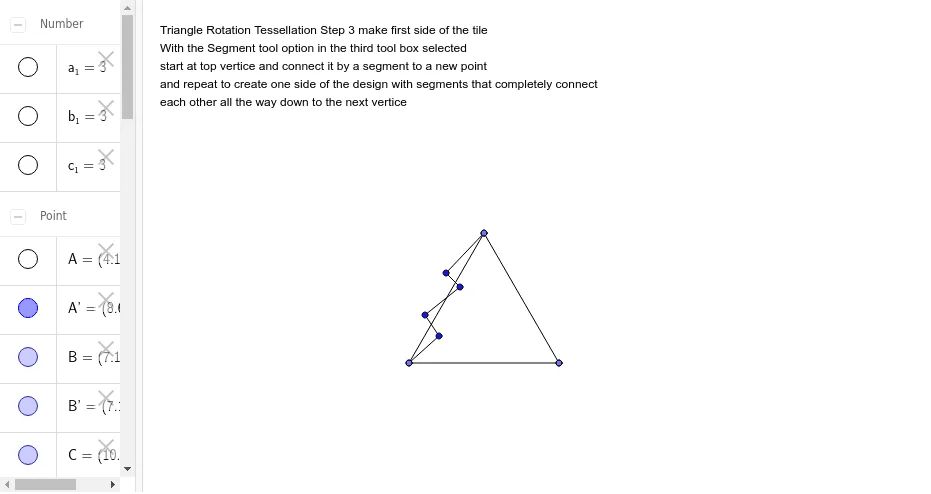
Triangle Rotation Tessellation Step 3: Make First Side of the Tile
Loading the math board and drawing, please wait…
In collections
Triangle Rotation Tessellation
This example demonstrates how to create a tessellation pattern by rotating a triangle, specifically showing the process of making the first tile. The core mathematical concepts involved include rotation, geometric construction, and polygon formation. The construction highlights the use of GeoGebra commands such as Point, Segment, and Rotate to create and position geometric objects like points A, B, C and their rotated counterparts A', B', C'. Suitable for middle school students and above to learn about geometric transformations and the composition of tessellation patterns.
GeoGebra Commands & Parameters
Point(Circle[A, 3]) → BSegment(A, B) → aPoint(Circle[B, 3]) → CSegment(B, C) → bPoint(Circle[C, 3]) → DSegment(C, D) → cRotate(A, -120*°, B) → A'Rotate(B, -120*°, B) → B'Segment(A', B') → a'Rotate(C, 120*°, C) → C'Rotate(D, 120*°, C) → D'Segment(C', D') → c'Segment(A', E) → dSegment(E, F) → eSegment(F, G) → fSegment(G, H) → gSegment(H, B) → h