
Triangle Rotation Tessellation Step Number 5 Apply Design
Loading the math board and drawing, please wait…
In collections
Triangle Rotation Tessellation
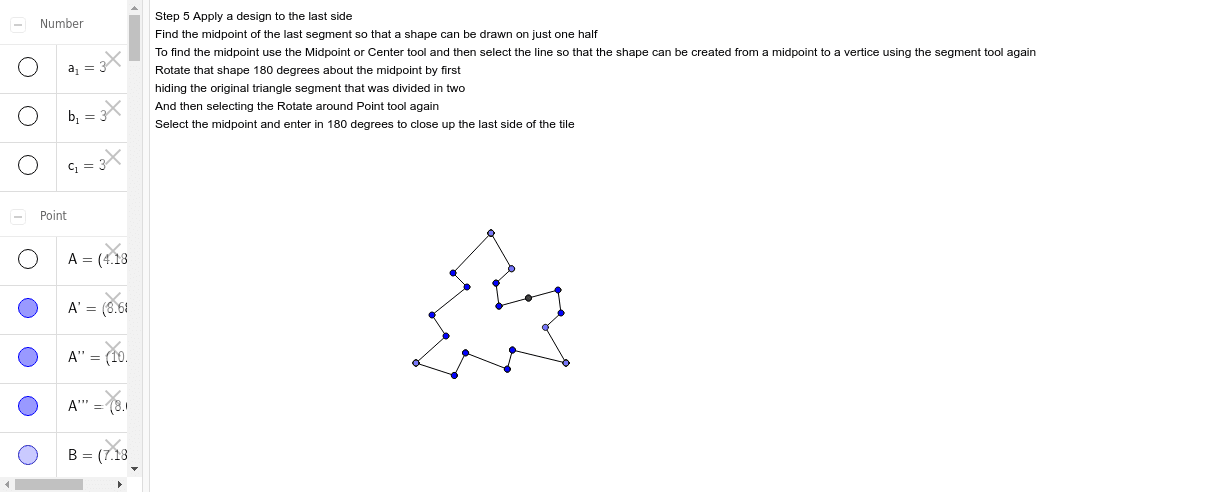
This example demonstrates how to create a rotation tessellation pattern by rotating a triangle and applying a design to the last side. The core math concepts involved include rotation, geometric transformations, and matrices. The construction uses GeoGebra commands: Point, Segment, Rotate, Midpoint, and objects such as A, a_1, B, a, b_1, C, b, c_1, D, c, A', B', a', C', D', c', E, d, F, e, G, f, H, g, h, A'', E', d', E'_1, F', e', F'_1, G', f', G'_1, H', g', H'_1, B'_1, h. Suitable for high school mathematics teaching or geometric construction learning.
GeoGebra Commands & Parameters
Point(Circle[A, 3]) → BSegment(A, B) → aPoint(Circle[B, 3]) → CSegment(B, C) → bPoint(Circle[C, 3]) → DSegment(C, D) → cRotate(A, -120*°, B) → A'Rotate(B, -120*°, B) → B'Segment(A', B') → a'Rotate(C, 120*°, C) → C'Rotate(D, 120*°, C) → D'Segment(C', D') → c'Segment(A', E) → dSegment(E, F) → eSegment(F, G) → fSegment(G, H) → gSegment(H, B) → hRotate(A', -60*°, B) → A''Rotate(E, -60*°, B) → E'Segment(A'', E') → d'Rotate(E, -60*°, B) → E'_1Rotate(F, -60*°, B) → F'Segment(E'_1, F') → e'Rotate(F, -60*°, B) → F'_1Rotate(G, -60*°, B) → G'Segment(F'_1, G') → f'Rotate(G, -60*°, B) → G'_1Rotate(H, -60*°, B) → H'Segment(G'_1, H') → g'Rotate(H, -60*°, B) → H'_1Rotate(B, -60*°, B) → B'_1Segment(H'_1, B'_1) → h'Rotate(B', -60*°, B) → B''Rotate(D', -60*°, B) → D''Midpoint(c') → ISegment(I, J) → iSegment(J, K) → jPoint(c') → LSegment(K, L) → kSegment(L, C) → lRotate(I, 180*°, I) → I'Rotate(J, 180*°, I) → J'Segment(I', J') → i'Rotate(J, 180*°, I) → J'_1Rotate(K, 180*°, I) → K'Segment(J'_1, K') → j'Rotate(K, 180*°, I) → K'_1Rotate(L, 180*°, I) → L'Segment(K'_1, L') → k'Rotate(L, 180*°, I) → L'_1Rotate(C, 180*°, I) → C'_1Segment(L'_1, C'_1) → l'Rotate(C', 180*°, I) → C''Rotate(A'', 180*°, I) → A'''Rotate(D'', 180*°, I) → D'''