
Triangle Interior Angles Dynamic Demonstration
Loading the math board and drawing, please wait…
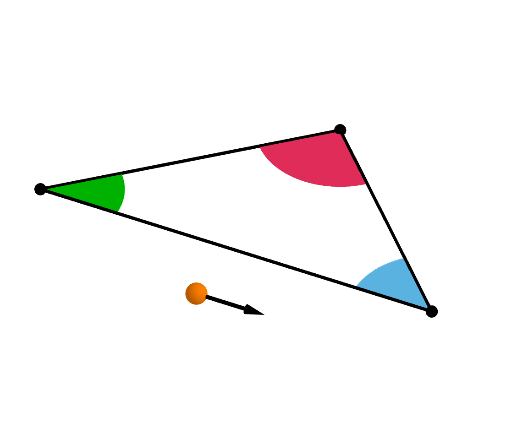
This GeoGebra example interactively demonstrates that the sum of the three interior angles of any triangle is always 180°. It covers core concepts such as the triangle angle sum theorem, angle measurement, rotation, and polygon angle relationships. The construction uses commands like Point, Polygon, Circle, Intersect, CircleSector, Rotate, Segment, Vector, and Midpoint to create the triangle, draw angle arcs, and translate or rotate the three angles to a common vertex for visual comparison. Dynamic sliders or draggable vertices allow users to explore how changing the triangle shape preserves the constant sum. Suitable for middle school geometry lessons, high school review, or math lab activities, this example enhances conceptual understanding through hands-on manipulation and geometric transformation.
GeoGebra Commands & Parameters
Point(xAxis) → APoint(Ray[A, A + (1, 0)]) → BPointIn(b) → CMidpoint(A, C) → DMidpoint(C, B) → ELine(D, E) → fMin({Distance[A, F], Distance[B, G], Distance[F, H], Distance[G, H], Distance[C, xAxis]}) → cCircle(A, (0.85 * c)) → dCircle(B, (0.85 * c)) → eCircle(C, (0.85 * c)) → gLine(A, C) → hLine(B, C) → iIntersect(d, h, 2) → IIntersect(g, h, 1) → JIntersect(g, i, 1) → KIntersect(e, xAxis, 1) → LIntersect(e, i, 2) → MIntersect(d, xAxis) → N, OCircleSector(A, O, I) → kCircleSector(C, J, K) → pCircleSector(B, M, L) → qMidpoint(C, H) → PLine(G, E) → tRotate(C, If[0 < v ≤ 1, (v * pi), pi], P, f) → C'Line(K, K - (0, 1)) → jLine(J, J - (0, 1)) → lIntersect(j, f) → QIntersect(f, l) → RRotate(K, If[0 < v ≤ 1, (v * pi), pi], Q, f) → K'Rotate(J, If[0 < v ≤ 1, (v * pi), pi], R, f) → J'CircleSector(C', J', K') → rRotate(B, If[1 < v ≤ 2, ((-(v - 1)) * pi), pi], G, t) → B'Line(M, M - (1, 0)) → mIntersect(t, m) → SRotate(M, If[1 < v ≤ 2, ((-(v - 1)) * pi), pi], S, t) → M'Rotate(L, If[1 < v ≤ 2, ((-(v - 1)) * pi), pi], G, t) → L'CircleSector(B', L', M') → sRotate(A, If[2 < v ≤ 3, ((v - 2) * pi), pi], F, t) → A'Rotate(O, If[2 < v ≤ 3, ((v - 2) * pi), pi], F, t) → O'Line(D, D - (0, 1)) → nIntersect(n, m) → TLine(I, I + (1, 0)) → f_1Intersect(f_1, n) → URotate(I, If[2 < v ≤ 3, ((v - 2) * pi), pi], U, t) → I'CircleSector(A', O', I') → c_1Segment(D, E) → g_1Polygon(D, C', E) → t1, e_1, d_1, c'Segment(D, C') → h_1Segment(C', E) → i_1Segment(E, C) → j_1Segment(C, D) → k_1Segment(G, E) → l_1Segment(F, D) → m_1Segment(E, B) → n_1Segment(B, G) → p_1Segment(G, H) → q_1Segment(B', E) → r_1Segment(B', G) → s_1Segment(A, C) → t_1Segment(C, B) → a_1Segment(B, G) → b_1Segment(A', D) → f_2Segment(A', F) → g_2Segment(A, D) → h_2Segment(A, F) → i_2Segment(F, H) → j_2Segment(A, F) → k_2Vector(W, W + (1, 0)) → uVector(W, W - (1, 0)) → w
AI Drawing Prompt Reference
Draw a triangle with draggable vertices, marking arcs at each interior angle to show the angle size. Then through rotation and translation animations, move these three angles sequentially to one endpoint of a line, demonstrating that they can combine to form a straight line and visually proving the triangle angle sum theorem equals 180 degrees. The animation proceeds in three steps showing each angle's movement.
The prompt above was compiled from the original drawing commands and is for reference only.