
Trapezoids and Vectors by Norm Prokup
Loading the math board and drawing, please wait…
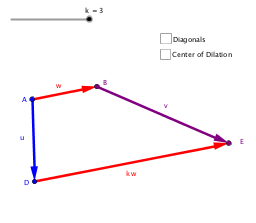
①This example demonstrates how to construct a trapezoid using vector operations, showing the relationships between parallel sides and vector addition/scalar multiplication. ②Core mathematical concepts include vector addition, scalar multiplication, parallel vectors, trapezoid definition, and line intersections, bridging vector geometry and plane geometry. ③Construction details: from the summary, commands include Vector (creating vectors w, kw, w_1), Segment, and Intersect; objects include points A, B, C, D, E, P, vectors u, v, d, e, and lines f, g, with vertex positions determined by vector relations. ④Suitable for high school or early college students learning vector geometry and geometric construction, and for teachers demonstrating dynamic links between vector addition and trapezoid properties.
GeoGebra Commands & Parameters
Vector(A, B) → wVector(D, E) → kwVector(C, A) → w_1Vector(C, B) → aVector(A, D) → uVector(B, E) → vSegment(A, E) → dSegment(B, D) → eIntersect(d, e) → P
AI Drawing Prompt Reference
Draw a trapezoid with two parallel sides determined by vector relationships. Place four vertices such that the top and bottom bases correspond to two parallel vectors, one being a scalar multiple of the other. Connect the legs, then draw two diagonals from the upper-left to lower-right and upper-right to lower-left vertices, marking their intersection. Include vector arrows along the sides and auxiliary vectors from vertices to show vector addition and scalar multiplication geometrically.
The prompt above was compiled from the original drawing commands and is for reference only.