
Translations: Visualizing Triangle Shift by a Vector
Loading the math board and drawing, please wait…
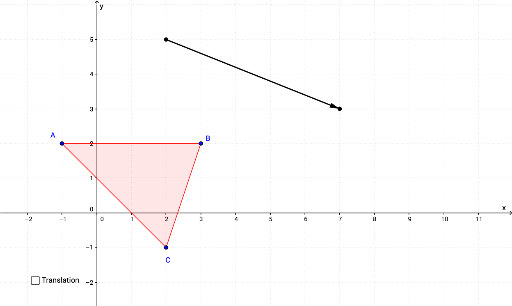
This GeoGebra example demonstrates the translation of a triangle under a given vector, showing how a rigid motion moves every point by the same displacement. The core mathematical concept is translation, a type of isometry that preserves distances, angles, and congruence. The construction uses the Polygon command to create the original triangle (poly1), the Vector command to define the translation vector u, and the Translate command to produce the image triangle (poly1'). Additional tools such as Segment, Midpoint, and Angle are used to construct auxiliary segments, midpoints, and angle labels, while text objects display corresponding vertices (A', B', C') and angle measures. This example is suitable for middle school to high school students learning geometric transformations, and serves as an effective visual aid for teachers to explain the properties of translations, including corresponding sides, angles, and congruence.
GeoGebra Commands & Parameters
Polygon(A, B, C) → poly1, c, a, bAngle(A, B, C) → ABCAngle(B, C, A) → BCAAngle(C, A, B) → CABVector(D, E) → uTranslate(A, u) → A'Translate(B, u) → B'Translate(C, u) → C'Polygon(A', B', C') → poly1', c', a', b'Angle(B', C', A') → A'C'B'Angle(A', B', C') → A'B'C'Angle(C', A', B') → B'A'C'Segment(D, F) → fSegment(E, F) → gMidpoint(f) → GMidpoint(g) → H
AI Drawing Prompt Reference
Draw a triangle ABC, then use vector DE to translate it into a new triangle A'B'C'. First, draw triangle ABC, then draw vector DE, and use vector DE to translate each vertex of triangle ABC to get the new triangle A'B'C'. Finally, draw auxiliary line segments DF and EF, and find their midpoints G and H.
The prompt above was compiled from the original drawing commands and is for reference only.