
Cone Filling a Cylinder: Volume Ratio Demonstration
Loading the math board and drawing, please wait…
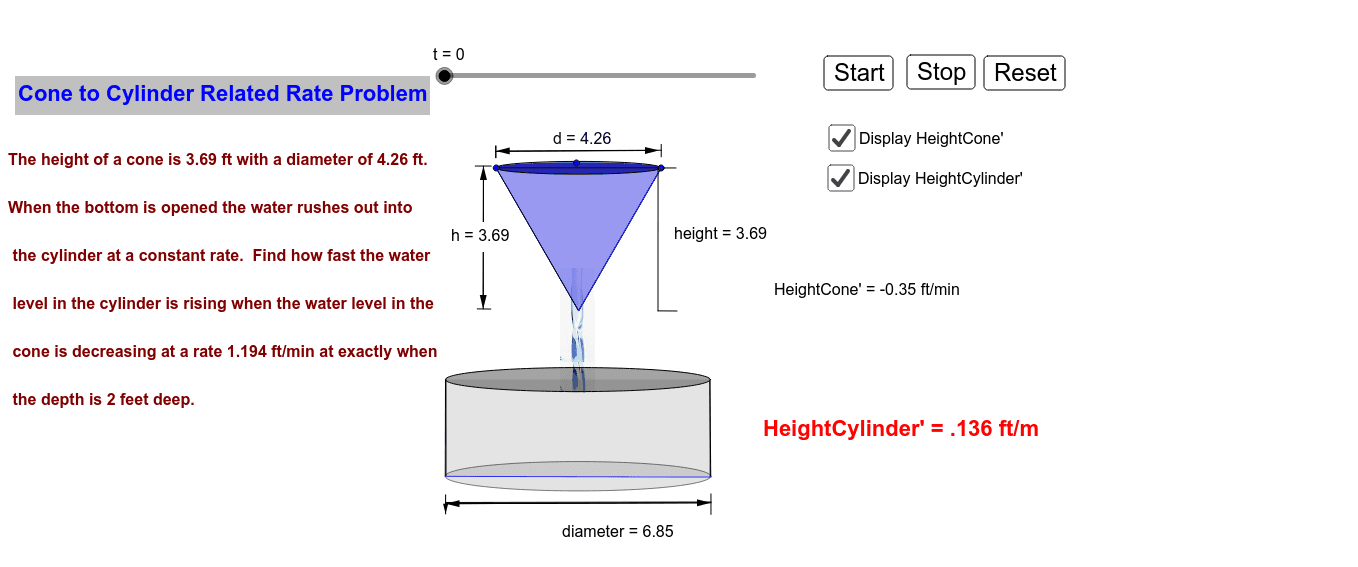
This GeoGebra example dynamically shows a cone filling a cylinder, visually demonstrating that the volume of a cone is one-third that of a cylinder with the same base and height. Core mathematical concepts include solids of revolution, volume ratios, similar triangles, proportional reasoning, and cross-sectional relationships in solid geometry. Construction highlights: uses Polygon for base faces, Ellipse for circular cross-sections, Intersect to find key points, Segment for edges, Point for vertices, Vector for direction, and Distance for measurements. Objects include the cone apex, cylinder base, lateral surfaces, heights, and auxiliary points, with buttons controlling the filling animation. Suitable for upper secondary or early university students learning volume formulas, and for teachers demonstrating the volume relationship in class.
GeoGebra Commands & Parameters
Polygon(A, B, 3) → poly1, d, b, c, CEllipse(D, E, F) → d_3Polygon(C, E, D) → poly2, d_1, c_1, eIntersect(d, b) → GIntersect(d, c) → HSegment(G, H) → fIntersect(d, b) → NIntersect(d, c) → OEllipse(N, O, P) → gEllipse(Q, R, S) → kPolygon(Q, R, T, U) → poly3, q, r, t_1, uEllipse(U, T, V) → pPoint(p) → WPoint(k) → ZSegment(W, Z) → jPoint(p) → A_1Point(k) → B_1Segment(A_1, B_1) → lPolygon(C_1, D_1, E_1, F_1) → poly4, c_2, d_2, e_1, f_1Ellipse(C_1, D_1, G_1) → sEllipse(F_1, E_1, H_1) → g_1Segment(I_1, J_1) → mSegment(I_1, J_1) → nSegment(K_1, L_1) → a_1Point(m) → M_1Vector(M_1, N_1) → vPoint(a_1) → O_1Point(m) → P_1Vector(O_1, P_1) → wSegment(Q_1, R_1) → aSegment(S_1, T_1) → b_1Point(a) → U_1Vector(U_1, V_1) → hVector(V_1, U_1) → v_1Distance(U_1, V_1) → distanceU1V1Segment(W_1, Z_1) → i_1Segment(B_2, A_2) → j_1Point(i_1) → C_2Vector(C_2, Z_1) → u_1Point(j_1) → D_2Vector(D_2, C_2) → diameter_1Vector(C_2, D_2) → k_1Point(i_1) → E_2Point(j_1) → F_2Segment(E_2, F_2) → diameterSegment(H_2, G_2) → heightSegment(G_2, I_2) → l_1Segment(H_2, J_2) → m_1
AI Drawing Prompt Reference
Draw a cylinder with a circular base and top, and a rectangular lateral surface. Inside the cylinder, place a cone whose base coincides with the cylinder's base and whose apex touches the center of the cylinder's top. The cone's lateral surface is tangent to the cylinder's sides. Use dashed lines or different colors to indicate the heights of the cone and cylinder, and label the ratio of their heights. Add a slider or animation button to control the cone filling from bottom to top, while displaying the volume ratio of cone to cylinder as one-third. Mark key points such as the base center, apex, and tangent points on the sides, and connect them with segments to show similar triangles.
The prompt above was compiled from the original drawing commands and is for reference only.