
Rotations and Reflections: Triangle Transformation Demo
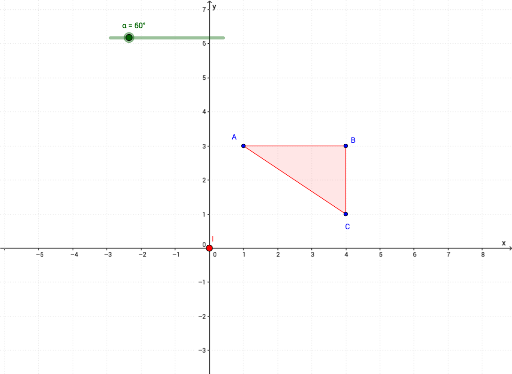
Loading the math board and drawing, please wait…
① This GeoGebra example dynamically demonstrates how a triangle undergoes rotation (Rotate) and reflection (Mirror) transformations, visually showing changes in position and orientation on the plane. ② Core mathematical concepts include rotational transformation, axial symmetry (reflection), polygons, angles, vectors, and integer operations, with auxiliary elements like isosceles triangles and tree diagrams to enrich understanding of geometric properties. ③ Construction highlights: The Rotate command is applied to triangle vertices A, B, C to generate rotated images A', B', C'; the Mirror command creates reflected copies; Polygon constructs both original and transformed shapes; Angle, Vector, Segment, and Midpoint commands annotate angles, vectors, sides, and midpoints; text objects (text1 to text19) display transformation parameters and explanations. ④ Suitable for middle school geometry lessons, this example helps teach rotation symmetry, mirror symmetry, and transformation combinations, and serves as an introductory dynamic geometry exploration to foster spatial visualization and logical reasoning.
GeoGebra Commands & Parameters
Rotate(A, α, I) → A'Rotate(B, α, I) → B'Rotate(C, α, I) → C'Mirror(C, h) → C'_3Mirror(B, h) → B'_3Mirror(A, h) → A'_3Polygon(A, B, C) → poly1, c, a, bAngle(A, B, C) → ABCAngle(B, C, A) → BCAAngle(C, A, B) → CABVector(D, E) → uAngle(B', C', A') → A'C'B'Angle(C', A', B') → B'A'C'Angle(A', B', C') → A'B'C'Segment(D, F) → fSegment(E, F) → gMidpoint(f) → GMidpoint(g) → HPolygon(A'_3, B'_3, C'_3) → poly1'_1, c'_2, a'_2, b'_2Polygon(A', B', C') → poly1'_2, c', a', b'
AI Drawing Prompt Reference
Draw triangle ABC, then rotate it around point I to get A'B'C'. Reflect A, B, and C over line h to get A'_3, B'_3, and C'_3. Construct the original triangle with A, B, and C, and the rotated triangle with A', B', and C'. Label the three interior angles of the triangles, use vectors and segments to represent related elements, and mark midpoints G and H.
The prompt above was compiled from the original drawing commands and is for reference only.