
Translation Example
Loading the math board and drawing, please wait…
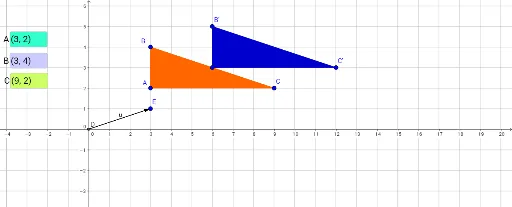
This example demonstrates the concept of translation transformation by translating a triangle to show vector properties. Key mathematical concepts include vectors, triangles, and translation. It uses commands like Polygon, Intersect, Vector, Translate, and Textfield in GeoGebra. Suitable for middle school and above students learning geometric transformations.
GeoGebra Commands & Parameters
Polygon(A, B, C) → poly1, c, a, bIntersect(xAxis, yAxis) → DVector(D, E) → uVector(D, E) → vTranslate(A, v) → A'Translate(B, v) → B'Translate(C, v) → C'Polygon(A', B', C') → poly1', c', a', b'Textfield(A) → InputBox1Textfield(B) → InputBox2Textfield(C) → InputBox3
AI Drawing Prompt Reference
Draw a triangle ABC, then translate it to a new position using vector DE to form a new triangle A'B'C'. First, draw triangle ABC, find the intersection point D of the x-axis and y-axis, construct vectors u and v, and translate points A, B, and C along vector v to A', B', and C' respectively, and finally draw the new triangle A'B'C'.
The prompt above was compiled from the original drawing commands and is for reference only.