
Symmetrical Rotation 1
Loading the math board and drawing, please wait…
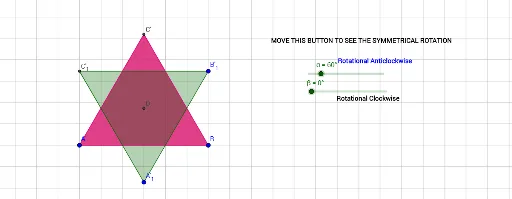
This example demonstrates the construction of symmetric figures through rotation. It involves core mathematical concepts like rotation, roots, statistical characteristics, arithmetic, cubes, and hypothesis testing. GeoGebra commands used include Circle, Intersect, Polygon, LineBisector, and Rotate. Suitable for high school mathematics teaching and geometric construction learning.
GeoGebra Commands & Parameters
Circle(A, B) → cCircle(B, A) → dIntersect(c, d, 1) → CPolygon(A, B, C) → poly1, c_1, a, bLineBisector(C, A) → fLineBisector(C, B) → gIntersect(f, g) → DRotate(A, (-β), D) → A'Rotate(B, (-β), D) → B'Rotate(C, (-β), D) → C'Polygon(A', B', C') → poly1', c', a', b'Rotate(A, α, D) → A'_1Rotate(B, α, D) → B'_1Rotate(C, α, D) → C'_1Polygon(A'_1, B'_1, C'_1) → poly1'_1, c'_1, a'_1, b'_1
AI Drawing Prompt Reference
Draw a symmetric triangle through rotation. First, draw two circles and find their intersection point C. Use points A, B, and C to form a triangle. Then, draw the perpendicular bisectors of AC and BC, which intersect at point D. Rotate the triangle around D by -β to get A', B', and C', and use these points to form a new triangle. Finally, rotate points A, B, and C around D by α to get A'_1, B'_1, and C'_1, and use these points to form the last triangle.
The prompt above was compiled from the original drawing commands and is for reference only.