
Three Planes Intersection (with Parallel Cases)
Loading the math board and drawing, please wait…
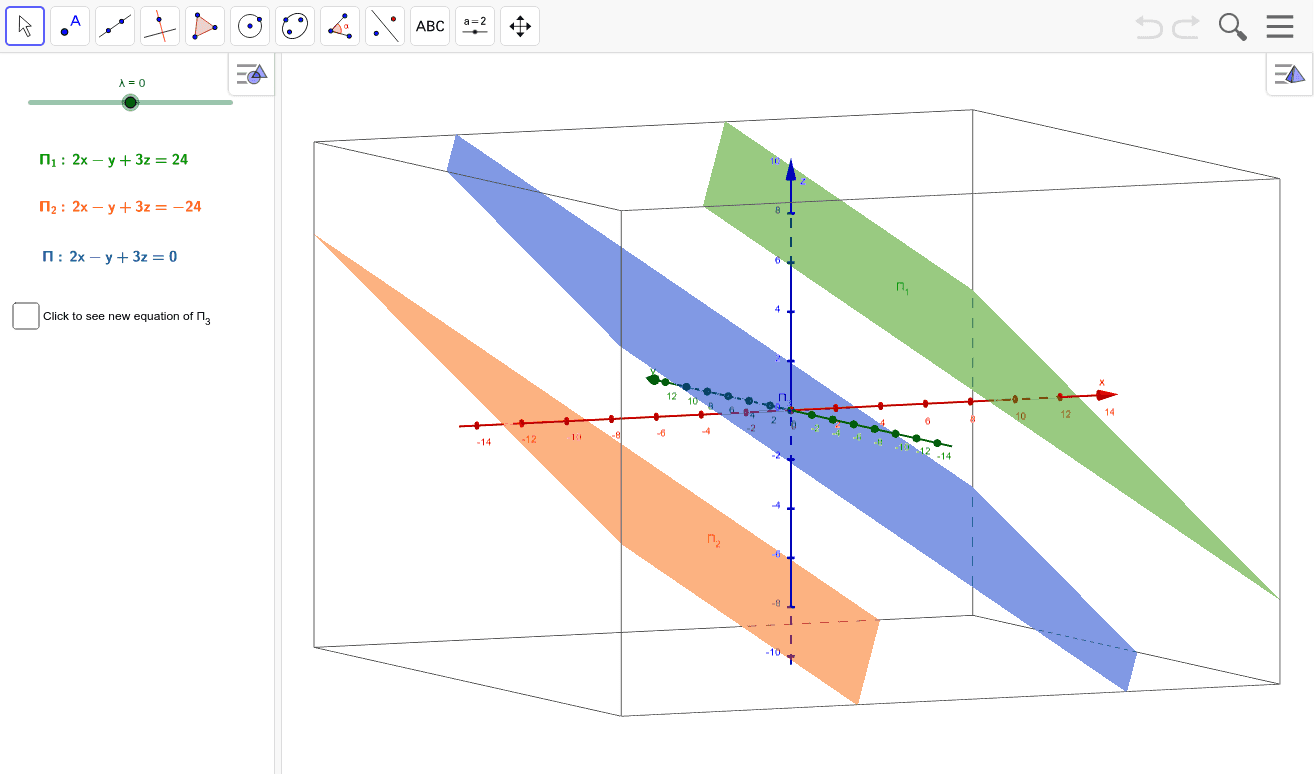
This GeoGebra example demonstrates the geometric relationship when three planes intersect in 3D space, especially focusing on cases involving parallel planes. Core mathematical concepts include plane equations in spatial analytic geometry, methods to find intersection lines between planes, and properties of parallel planes. The construction uses Vector command to create normal vectors, Line command to draw intersection lines, Plane command to build adjustable planes, IntersectPath command to display intersection paths, and LaTeX to show plane equations. Ideal for high school and early college students learning spatial geometry or as a visual teaching tool for vector mathematics in 3D space.
GeoGebra Commands & Parameters
Vector((2, 4, λ)) → uLine((0, 0, 0), u) → dPlane((3, 3, -1), d) → Π_3IntersectPath(Π_3, Π_1) → aIntersectPath(Π_3, Π_2) → bLaTeX(Π_1, true, true) → text1LaTeX(Π_2, true, true) → text2LaTeX(Π, true, true) → text3LaTeX(Π_3, true, true) → text4
AI Drawing Prompt Reference
Draw the intersection of three planes in 3D space, focusing on cases with parallel planes. Start by creating a vector through the origin and use it to draw a line. Then, construct a plane based on this line and a point. Next, find and display the intersection lines between this plane and the other two planes. Finally, label each plane's equation using mathematical formulas to observe the geometric relationship of parallel planes.
The prompt above was compiled from the original drawing commands and is for reference only.