
The Wondrous Journey of a Square Wheel
Loading the math board and drawing, please wait…
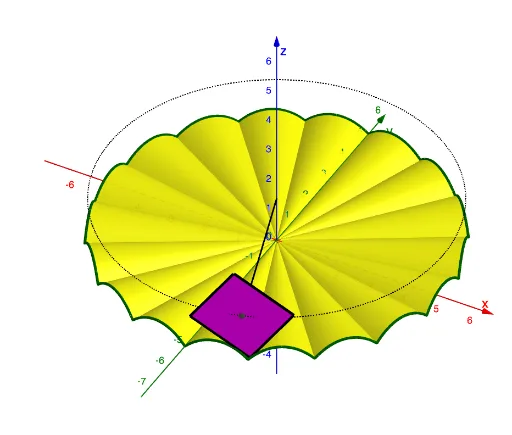
This example demonstrates the fascinating phenomenon of a square wheel rolling on a specific surface. Key mathematical concepts include parametric curves and transformations. Using commands like CurveCartesian, Surface, and Sequence in GeoGebra, the construction of this special rolling path is shown. Suitable for high school students or math enthusiasts exploring geometric transformations and parametric equations.
GeoGebra Commands & Parameters
CurveCartesian((5 * cos(t)), (5 * sin(t)), sqrt(2), t, 0, (2 * π)) → eCurveCartesian((b, t, f(t)), t, -10, 10) → cSurface((u * x(c(t))), (u * t), (u * f(t)), t, (-a), a, u, 0, 1) → dSequence(Rotate[c, ((w * 2) * π / 18)], w, 1, 36) → l1Sequence(Rotate[d, ((w * 2) * π / 18)], w, 1, 36) → l2Line(B, A) → gOrthogonalPlane(A, g) → hCircle(A, sqrt(2), g) → kCircle(A, 1, g) → pPlane(g, zAxis) → iIntersect(i, p) → C, DOrthogonalLine(C, i) → jIntersect(j, k) → E, FRotate(F, (-4.5 * s), g) → F'Rotate(F', π / 2, g) → F''Rotate(F', (2 * π / 2), g) → F''_1Rotate(F', (3 * π / 2), g) → F''_2Polygon(F', F'', F''_1, F''_2) → q1, f', f'', f''_1, f''_2Segment(A, B) → l
AI Drawing Prompt Reference
Draw the path of a square wheel rolling on a specific surface. First, draw a circle with a radius of 5, then use parametric curves to draw the circle's trajectory. Next, draw a line and a square, and rotate a series of squares around the square. Finally, draw the path of the square wheel rolling on the surface, including the rotation and flipping of the square.
The prompt above was compiled from the original drawing commands and is for reference only.