
The Tangent Line Problem (Revisited)
Loading the math board and drawing, please wait…
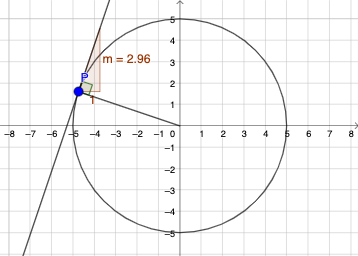
This example demonstrates the construction of a tangent line to a function at a specific point, highlighting geometric interpretations. Core math concepts include derivatives, tangent line equations, function graphs, and special points. It utilizes GeoGebra commands like Point, Intersect, Segment, OrthogonalLine, Circle, Angle, and Slope for construction. Suitable for university calculus courses or advanced math enthusiasts exploring the geometric meaning of derivatives.
GeoGebra Commands & Parameters
Point(eq1) → PIntersect(xAxis, yAxis) → BSegment(B, P) → fOrthogonalLine(P, f) → gCircle(P, 3) → cIntersect(c, g, 1) → CAngle(B, P, C) → αSlope(g) → m
AI Drawing Prompt Reference
Draw the tangent line to a function at a specific point. Start by selecting a point P on the function curve, then find the intersection B of the x-axis and y-axis. Draw a line segment f from B to P. Construct a line g perpendicular to f at point P. Draw a circle c with radius 3 centered at P. Find the intersection C of circle c and line g. Measure the angle BPC and calculate the slope m of line g.
The prompt above was compiled from the original drawing commands and is for reference only.