
The Second Derivative
Loading the math board and drawing, please wait…
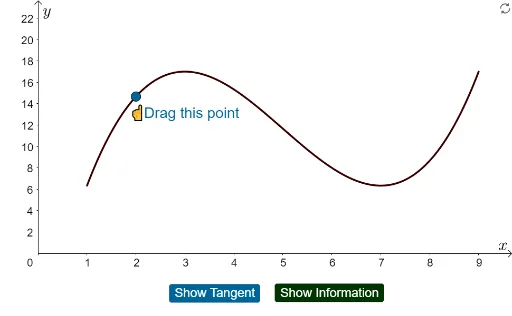
This example illustrates the concept of the second derivative. By analyzing the second derivative of a function, one can understand the concavity of the function. The construction summary uses commands like Tangent, Point, Polygon, Derivative, Slope, Segment to demonstrate how to use GeoGebra to draw functions and their derivatives. Suitable for high school mathematics education and students learning calculus.
GeoGebra Commands & Parameters
Tangent(A, g) → fPoint(xAxis) → DPolygon(B, C, D, E) → q1, b, c, d, eDerivative(g) → g'Derivative(g') → g''Point(xAxis) → HPolygon(F, G, H, I) → q2, f_1, g_1, h_1, i_1Slope(f) → mSegment(K, J) → j
AI Drawing Prompt Reference
Draw a function and its second derivative. First, plot the function g, then take point D on the x-axis and connect it with points B, C, and E on g to form a polygon. Next, calculate the first and second derivatives of g, g' and g'', and take point H on the x-axis, connecting it with points F, G, and I on g' to form another polygon. Finally, draw the tangent line f of g at point A and mark the slope m of the tangent line.
The prompt above was compiled from the original drawing commands and is for reference only.