
Creating Box Plots
Loading the math board and drawing, please wait…
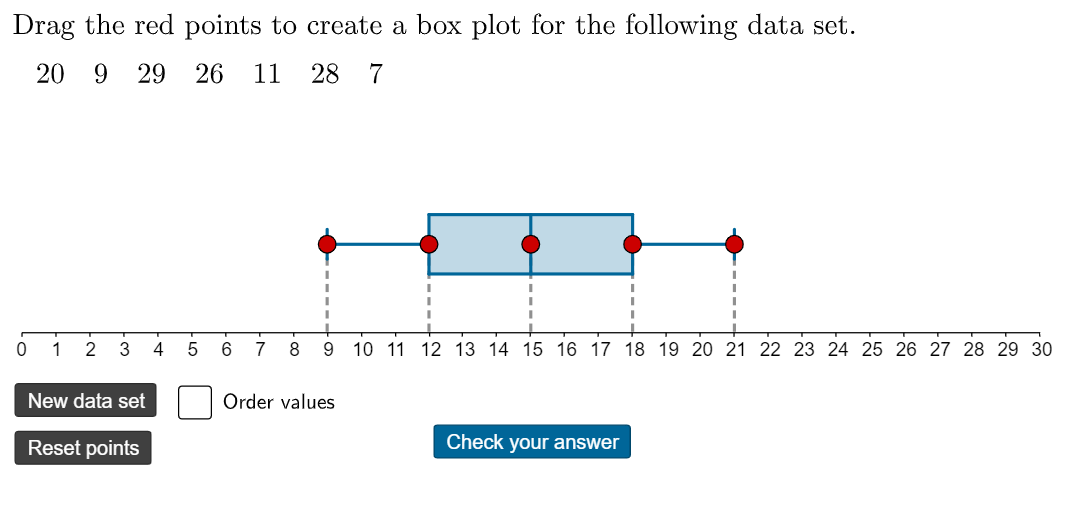
This example practices creating box plots with random data. A box plot is a statistical chart that shows the distribution of a dataset. The core mathematical concepts involved include the median, quartiles, and data sorting. Using GeoGebra commands such as Segment, Point, Random, Sequence, and Sort, the distribution characteristics of the data can be intuitively demonstrated. Suitable for students at the junior high school level and above learning statistics.
GeoGebra Commands & Parameters
Segment((0, 3), (30, 3)) → p_1Point(p_1) → TPoint(p_1) → SPoint(p_1) → RPoint(p_1) → QPoint(p_1) → PRandom(6, 15) → valuesused, 7Sequence(RandomElement[numbers], k, 1, valuesused) → values, {20, 9, 29, 26, 11, 28, 7}Sort(values) → valuessortedIf(sort, TableText[valuessorted], TableText[values]) → valuesdisplayedMedian(values) → medianQ1(values) → Q1Q3(values) → Q3Segment(D, E) → gSegment(F, G) → hSegment(G, K) → iSegment(K, J) → jSegment(J, F) → kSegment(H, I) → lSegment(L, M) → mPolygon(F, J, K, G) → q1, f_1, j_1, k_1, g_1Segment(O, N) → nSegment(B, A) → qSegment(P, Q) → rSegment((x(Q), 4), (x(Q), 2)) → tSegment((x(Q), 4), (x(S), 4)) → cSegment((x(Q), 2), (x(S), 2)) → dSegment((x(R), 4), (x(R), 2)) → aSegment((x(S), 4), (x(S), 2)) → bSegment(S, T) → sPolygon((x(Q), 4), (x(S), 4), (x(S), 2), (x(Q), 2)) → q2, e, h_1, i_1, l_1Segment(P, U) → fSegment(Q, V) → r_1Segment(R, W) → s_1Segment(S, Z) → t_1Segment(T, A_1) → a_1Segment((x(P), 3.5), (x(P), 2.5)) → m_1Segment((x(T), 3.5), (x(T), 2.5)) → n_1
AI Drawing Prompt Reference
Draw a box plot to show data distribution, including a horizontal baseline with seven randomly distributed points above it, colored differently for original and sorted data. Construct the box plot on the baseline, marking the median, first quartile, and third quartile, and connect these points with lines to form the box and whiskers.
The prompt above was compiled from the original drawing commands and is for reference only.