
Data Analyzer - One Variable
Loading the math board and drawing, please wait…
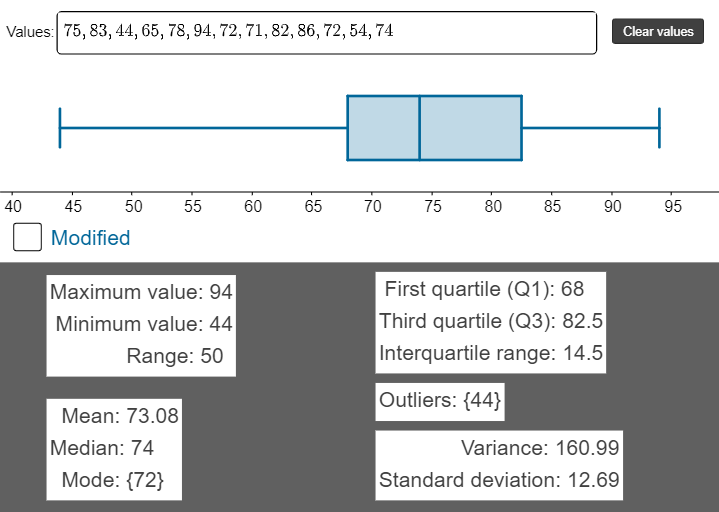
This applet is designed for analyzing single-variable data. It demonstrates how to calculate and visualize statistics such as maximum, minimum, median, mean, variance, standard deviation, and mode. Using GeoGebra commands like Max, Min, mean, stdevp, Median, etc., users can gain a clear understanding of these statistical concepts. Suitable for high school and above students and teachers.
GeoGebra Commands & Parameters
Max(values) → maxQ3(values) → Q3Q1(values) → Q1RemoveUndefined(Zip[If[n < Q1 - (1.5 * IQR) ∨ n > Q3 + (1.5 * IQR), n], n, values]) → outliersMax(valuesmod) → maxmodMin(values) → minMin(valuesmod) → minmodTextfield(values) → InputBox1mean(values) → meanMedian(values) → medianVariance(values) → variancestdevp(values) → SDMode(values) → modeLength(values) → lengthSegment((median, f(1) + 0.5), (median, f(1) - 0.5)) → gPolygon(F, H, I, G) → q1, f_1, h, i, g_1Segment(B, A) → jSegment(D, E) → kCorner(1) → JCorner(2) → KCorner(3) → LSegment((If[modified, minmod, min], f(1) + 0.3), (If[modified, minmod, min], f(1) - 0.3)) → lSegment((If[modified, maxmod, max], f(1) + 0.3), (If[modified, maxmod, max], f(1) - 0.3)) → mZip((k, 1), k, outliers) → l1
AI Drawing Prompt Reference
Create a statistical chart for analyzing single-variable data, displaying the maximum, minimum, third quartile, first quartile, median, mean, variance, standard deviation, and mode of a dataset. Include a text box for inputting the data, and markers for each statistical value. Draw lines to indicate the positions of the median, maximum, and minimum, differentiate between normal data and outliers, and use polygons and segments to show the quartile ranges.
The prompt above was compiled from the original drawing commands and is for reference only.