
The Butterfly Effect for Adding Fractions
Loading the math board and drawing, please wait…
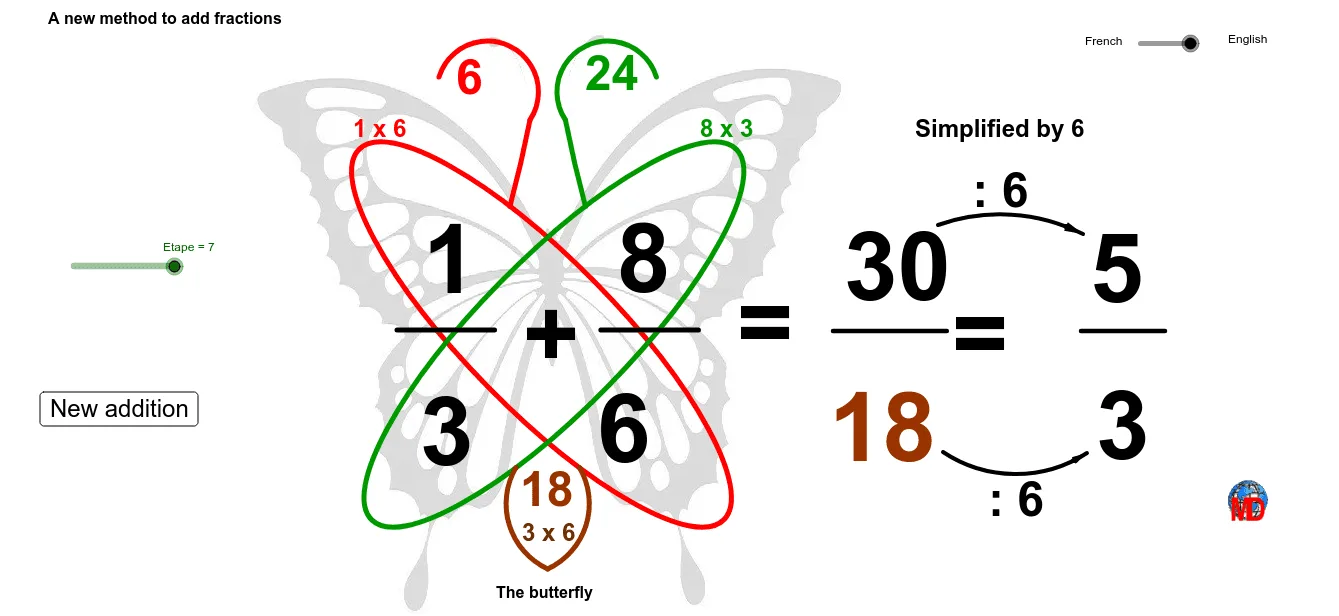
This GeoGebra example visualizes the butterfly method for adding fractions, where the cross-multiplication of numerators and denominators is represented through dynamic geometric constructions. The core mathematical concepts include fraction addition, greatest common divisor (GCD), and random number generation. The construction uses commands such as Random, If, Ellipse, OrthogonalLine, Mirror, Point, CircumcircleArc, Segment, GCD, and Vector to create butterfly-wing-like shapes that illustrate the steps of the algorithm. Text objects display the fractions and results, while sliders or random inputs allow exploration. This is suitable for middle school students learning fraction operations and geometric construction, as well as for teachers demonstrating the butterfly algorithm in an interactive way.
GeoGebra Commands & Parameters
Random(1, 9) → n'1Random(1, 9) → d1Random(1, 9) → d'2If(n'1 ≟ d1, n'1 + 1, n'1) → n1Random(1, 9) → n2If(d'2 ≟ d1, d1 + 1, d'2) → d2Ellipse(A, B, C) → cOrthogonalLine(D, xAxis) → aMirror(c, a) → c'Point(c) → ECircumcircleArc(E, F, G) → dCircumcircleArc(G, H, I) → eMirror(E, a) → E'Mirror(F, a) → F'Mirror(G, a) → G'CircumcircleArc(E', F', G') → d'Mirror(G, a) → G'_1Mirror(H, a) → H'Mirror(I, a) → I'CircumcircleArc(G'_1, H', I') → e'Segment(J, K) → bMirror(J, a) → J'Mirror(K, a) → K'Segment(J', K') → b'Point(c') → LPoint(a) → MCircumcircleArc(L, O, M) → fMirror(L, a) → L'Mirror(O, a) → O'Mirror(M, a) → M'CircumcircleArc(L', O', M') → f'Segment(N, P) → gGCD(nres, dd) → mSegment(Q, R) → hCircumcircleArc(S, T, U) → kCircumcircleArc(V, W, Z) → pPoint(k) → A_1Vector(A_1, U) → uPoint(p) → B_1Vector(B_1, Z) → v
AI Drawing Prompt Reference
Create a geometric illustration of the butterfly method for adding fractions. Start with a horizontal symmetry axis. Above the axis, draw an ellipse to form the upper wing, then mirror it below the axis for the lower wing. Add arcs and segments on both wings to represent the cross-multiplication paths. Place points to mark the numerators and denominators, and use arrows or vectors to show the multiplication direction. Display the two fractions and their sum as text near the center, along with the simplified result. Ensure the design is symmetric, with distinct colors for upper and lower parts, emphasizing the butterfly shape and the fraction operation.
The prompt above was compiled from the original drawing commands and is for reference only.