
The Bridge and the Train: Addition for Children
Loading the math board and drawing, please wait…
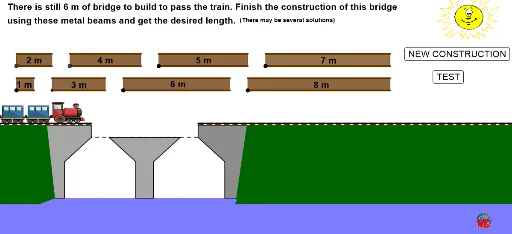
This example dynamically demonstrates a train crossing a bridge to visually illustrate the application of addition in a geometric context. It involves core math concepts like addition, geometric figure construction, and coordinate geometry. GeoGebra commands and objects used include Random, Segment, Polygon, If, Point, Intersect, and Midpoint. Suitable for lower elementary students to understand the initial connection between addition and geometry.
GeoGebra Commands & Parameters
Random(6, 20) → aaSegment(B, H) → r_5Polygon(S_4, T_4, U_4, V_4) → poly25, s_6, t_6, u_4, v_4Polygon(W_4, Z_4, A_5, B_5) → poly26, w_4, z_4, a_7, b_7Polygon(C_5, D_5, E_5, F_5) → poly27, c_8, d_7, e_8, f_8Polygon(G_5, H_5, I_5, J_5) → poly28, g_8, h_8, i_7, j_7Polygon(K_5, L_5, M_5, N_5) → poly29, k_8, l_8, m_8, n_8Polygon(O_5, P_5, Q_5, R_5) → poly30, o_5, p_8, q_8, r_8Polygon(S_5, T_5, U_5, V_5) → poly31, s_7, t_7, u_5, v_5Polygon(W_5, Z_5, A_6, B_6) → poly32, w_5, z_5, a_8, b_8If(x(F_5) ≥ -2 ∨ x(N_5) ≥ -2 ∨ x(P_5) ≥ -2 ∨ x(Z_5) ≥ -2 ∨ x(Z_4) ≥ -2 ∨ x(J_5) ≥ -2 ∨ x(T_5) ≥ -2 ∨ x(T_4) ≥ -2, 1, 0) → rrPolygon(B, H, C, D) → poly1, b, h, c, dIf(y(C_5) ≟ 0 ∨ y(K_5) ≟ 0 ∨ y(O_5) ≟ 0 ∨ y(W_5) ≟ 0 ∨ y(W_4) ≟ 0 ∨ y(G_5) ≟ 0 ∨ y(S_5) ≟ 0 ∨ y(S_4) ≟ 0, 1, 0) → ssPoint(b) → JPolygon(E, J, D, I, G, F) → poly2, e, j, d_1, i, g, fIntersect(h, b) → OPolygon(O, K, L, M, N, C) → poly3, o_1, k, l, m, n, c_1Midpoint(D, C) → PPolygon(R, Q, S, V, U, T) → poly4, r, q, s, v, u, tIf(Distance[b, c_8] < 0.2, 2, 0) → dd1If(Distance[b_7, b] < 0.2, 1, 0) → dd2If(Distance[g_8, b] < 0.2, 3, 0) → dd3If(Distance[k_8, b] < 0.2, 4, 0) → dd4If(Distance[r_8, b] < 0.2, 5, 0) → dd5If(Distance[v_5, b] < 0.2, 6, 0) → dd6If(Distance[b_8, b] < 0.2, 7, 0) → dd7If(Distance[v_4, b] < 0.2, 8, 0) → dd8If(som ≟ aa, true, false) → ppPolygon(G, M, L, Z, A_1, F) → poly5, g_1, m_1, l_1, z, a_1, f_1Polygon(B_1, D_1, F, A_1, C_1) → poly6, b_1, d_2, f_2, a_2, c_2Polygon(F_1, E_1, G_1, Z) → poly7, f_3, e_1, g_2, z_1Segment(H + (0, 0.15), B + (0, 0.15)) → h_1Segment(B_1 + (0, 0.1), B + (0, 0.1)) → pSegment(B_1 + (0, 0.15), B + (0, 0.15)) → i_1Segment(H + (0, 0.1), E_1 + (0, 0.1)) → j_1Segment(H + (0, 0.15), E_1 + (0, 0.15)) → k_1Segment(H + (0, 0.1), B + (0, 0.1)) → n_1Intersect(c_2, a_2) → H_1Polygon(H_1, I_1, J_1, K_1) → poly8, h_2, i_2, j_2, k_2
AI Drawing Prompt Reference
Draw a bridge made of several connected quadrilaterals, with a flat deck composed of rectangles and trapezoids. Below the bridge, a railway track runs horizontally, and a train with multiple rectangular cars moves from left to right. The bridge has support structures on both sides. Above or beside the bridge, display a random number, and include a status indicator that shows success when the train fully crosses. The scene is for children's math education, emphasizing addition, with simple shapes and clear colors.
The prompt above was compiled from the original drawing commands and is for reference only.