
The 5th Set of Nets: Rotated Polygon Configurations
Loading the math board and drawing, please wait…
In collections
How many nets of a cuboid are there?
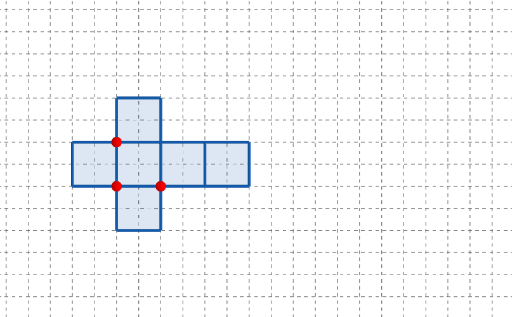
This example demonstrates how to build the “5th set” of a net-like geometric configuration by repeatedly applying rotational transformations, making the resulting polygon patterns align through symmetry and consistent placement. The key math ideas include geometric transformations (rotation), polygon construction, and how symmetry governs the repeated structure; it can also be interpreted with a vector/directed-position viewpoint to explain how points move relative to a reference. Construction approach in GeoGebra: Point is used to define key vertices (e.g., A, B, C and labeled points such as q1, q2, q5, q6), Polygon connects these points to form the net unit(s)/outline, and Rotate generates rotated copies (including corresponding primed objects like q2', q5', and q6') to produce the specifically labeled 5th set. Additional interactive elements (e.g., button1, button2) help step through or switch between stages, while text1 provides annotations for the construction sequence. Suitable for upper-secondary through early college geometry lessons and transformation-based visualization tasks.
GeoGebra Commands & Parameters
Point(Ray[(1, 0), (3, 0)]) → APoint(Ray[A + (1, 0), A + (2, 0)]) → CPoint(Ray[A + (0, 1), A + (0, 2)]) → BPolygon({(0, 0), A, B, (0, y(B))}) → q1Polygon({A, C, (x(C), y(B)), B}) → q2Polygon({C, C + (l, 0), C + (l, w), C + (0, w)}) → q5Polygon({C + (l, 0), C + (l + h, 0), C + (l + h, w), C + (l, w)}) → q6Rotate(q2, (90° * t), Line[B, A]) → q2'Rotate(Rotate[q5, (90° * t), Line[C + (0, w), C]], (90° * t), Line[B, A]) → q5'Rotate(Rotate[Rotate[q6, (90° * t), Line[C + (l, w), C + (l, 0)]], (90° * t), Line[C + (0, w), C]], (90° * t), Line[B, A]) → q6'_{1}Polygon({A, C, C + (0, (-l)), A + (0, (-l))}) → q3Rotate(Rotate[q3, (90° * t), Line[C, A]], (90° * t), Line[B, A]) → q3'Polygon({B, B + (h, 0), B + (h, l), B + (0, l)}) → q4Rotate(Rotate[q4, (90° * t), Line[B, B + (h, 0)]], (90° * t), Line[B, A]) → q4'
AI Drawing Prompt Reference
Create a planar net-like polygon configuration based on right-angle geometry. First place a base point from a horizontal ray starting at the origin, then generate adjacent vertices using horizontal and vertical rays so that key corners align. Construct the first orthogonal polygon as a reference unit, then build additional polygon regions on the right consisting of two rectangle-shaped parts sharing an edge. Use repeated rotations about an axis passing through the two main base points to generate the rotated copies of the constructed polygon units, assembling them into the specific “5th set” symmetric arrangement. Also draw the corresponding lower rectangular-edge polygon and rotate it about the same axis to complete the consistent placement of all parts.
The prompt above was compiled from the original drawing commands and is for reference only.