
Tetrahedron Cut into Four Regular Prisms
Loading the math board and drawing, please wait…
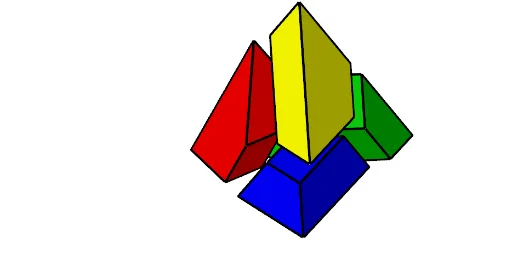
This GeoGebra example demonstrates how a regular tetrahedron can be cut into four congruent regular prisms, visualizing a fascinating 3D dissection. The core mathematical concepts involve the symmetry of a tetrahedron, midpoints, centroids, plane bisectors, and translation transformations. The construction uses commands such as Point, Tetrahedron, Midpoint, PlaneBisector, Vector, Centroid, and Translate to create the tetrahedron, define cutting planes, and separate the resulting prisms for clear visualization. This is ideal for high school or university solid geometry lessons, helping students understand spatial decomposition, volume relationships, and the power of geometric transformations in 3D.
GeoGebra Commands & Parameters
Point(Circle[Midpoint[A, B], (Distance[A, B] * sqrt(3) / 2), Segment[A, B]]) → CTetrahedron(A, B, C) → b, D, areteCD, areteBD, polyABC, polyACD, polyABD, polyBCD, AC, AB, areteBC, ADMidpoint(AC) → EMidpoint(AD) → FMidpoint(F, E) → GMidpoint(A, F) → HMidpoint(B, A) → IMidpoint(B, D) → JMidpoint(J, I) → KMidpoint(I, B) → LMidpoint(areteBC) → NMidpoint(E, N) → OMidpoint(areteCD) → PPlaneBisector(M, K) → cPlaneBisector(G, J) → dMidpoint(P, J) → QMidpoint(N, C) → RMidpoint(H, K) → SVector(M, S) → uCentroid(Polygon[Q, R, B, J]) → TPoint(l3) → UVector(U, T) → vCentroid(Polygon[D, J, K, H]) → VMidpoint(D, P) → ZCentroid(Polygon[Z, G, E, C]) → WVector(M, W) → wVector(M, V) → eTranslate(Rotate[l2, Animation, Segment[J, E]], Vector[(Animation * w)]) → l2'Translate(Rotate[l4, Animation, W], Vector[(Animation * e)]) → l4'Translate(Rotate[l3, Animation, T], Vector[(Animation * v)]) → l3'Translate(Rotate[l1, Animation, S], Vector[(Animation * u)]) → l1'_1Translate(Rotate[l1, Animation, S], Vector[(Animation * u)]) → l5Translate(Rotate[l2, Animation, Segment[J, E]], Vector[(Animation * w)]) → l6Translate(Rotate[l3, Animation, T], Vector[(Animation * v)]) → l7Translate(Rotate[l4, Animation, W], Vector[(Animation * e)]) → l8
AI Drawing Prompt Reference
Draw a regular tetrahedron and cut it into four congruent regular prisms. Start with the tetrahedron, mark midpoints of edges, and connect relevant midpoints to form cutting planes that divide the tetrahedron into four prisms. Each prism can be rotated about its center and translated along specific vectors to separate them for visualization. The figure includes the tetrahedron's faces, internal cutting lines, four separated prisms, and vectors indicating translation directions. Overall, it shows symmetric decomposition and transformation in 3D space.
The prompt above was compiled from the original drawing commands and is for reference only.