
Test Yourself: Factorising Practice
Loading the math board and drawing, please wait…
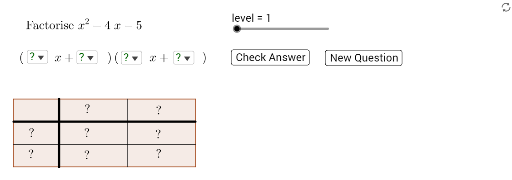
This interactive GeoGebra example is a self-test exercise for practicing polynomial factorization. It randomly generates polynomial expressions and asks the user to select the correct factorization from given options, reinforcing algebraic manipulation skills. The core mathematical concepts include factoring out common factors, difference of squares, perfect square trinomials, and other standard factorization techniques. The construction uses commands such as RandomElement to generate random coefficients, If and GCD to compute greatest common divisors, Polynomial to create expressions, LaTeX for clear formula display, and geometric objects like Polygon, Point, and Segment to build the answer interface, with buttons (button1, button2) for interactive feedback. It is suitable for middle school to high school students learning algebra, and can be used for self-assessment, classroom practice, or as a supplementary teaching resource.
GeoGebra Commands & Parameters
RandomElement(list3) → bIf(level ≟ 1, 1, level ≟ 2, RandomElement[list2], RandomElement[list4]) → aGCD(a, b) → hcf1Polynomial((aa * x) + bb) → hRandomElement(list3) → dIf(level ≟ 1, 1, level ≟ 2, RandomElement[list2], RandomElement[list5]) → cGCD(c, d) → hcf2Polynomial((cc * x) + dd) → pPolynomial(f) → gLaTeX("\text{Factorise }" + g) → text1Polygon(A, B, C, D) → poly1, a_1, b_1, c_1, d_1Point(d_1) → EPoint(b_1) → FSegment(E, F) → iSegment(G, H) → jSegment(I, J) → kPoint(d_1) → KPoint(b_1) → LSegment(K, L) → lSelectedElement(list6) → aAnsSelectedElement(list7) → bAnsSelectedElement(list8) → cAnsSelectedElement(list9) → dAnsLaTeX(Polynomial[(aAns * x)]) → text4LaTeX(bAns) → text5LaTeX(Polynomial[(cAns * x)]) → text2LaTeX(dAns) → text6LaTeX(Polynomial[((aAns * cAns) * x^(2))]) → text7LaTeX(Polynomial[((aAns * dAns) * x)]) → text8LaTeX(Polynomial[((bAns * cAns) * x)]) → text9LaTeX(Polynomial[(bAns * dAns)]) → text10Polynomial(((aAns * cAns) * x^(2)) + (((aAns * dAns) + (bAns * cAns)) * x) + (bAns * dAns)) → ansPolynomial(((aa * cc) * x^(2)) + (((aa * dd) + (bb * cc)) * x) + (bb * dd)) → correctLaTeX("\text{Your expression expands to }" + ans + "\cr \text{which is" + (If[ans ≟ g, " ", " not "]) + "correct}") → text11LaTeX("\text{My answer is }" + (LaTeX[f])) → text12LaTeX("\left( \phantom{99999}x+\phantom{99999} \right) \left(\phantom{99999} x+\phantom{99999} \right)") → text3
AI Drawing Prompt Reference
Create an interactive practice interface for polynomial factorization. In the center, display a quadratic polynomial expression in large LaTeX format. Below it, show two blank binomial templates with input fields. On the right or bottom, provide four answer buttons, each showing a possible factorization. After selection, display feedback text indicating whether the expanded expression is correct, along with the correct answer. The layout should be clean, with a title, formula, buttons, and feedback area, suitable for student self-assessment.
The prompt above was compiled from the original drawing commands and is for reference only.