
Tessellation from Triangle (Step 2)
Loading the math board and drawing, please wait…
In collections
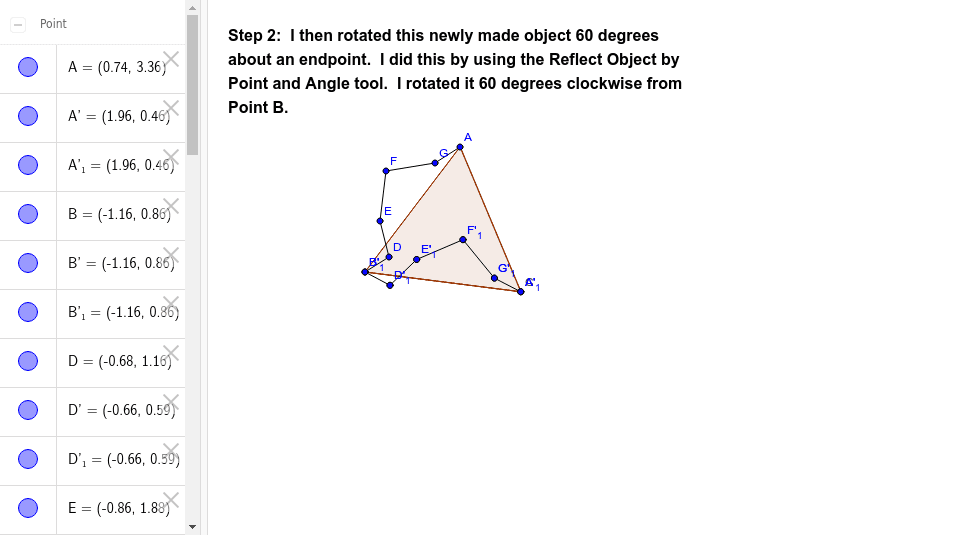
Tessellation from Triangle using Rotation
This example demonstrates the process of constructing a tessellation pattern using triangle rotations. Core math concepts include rotation, natural numbers, and fractal geometry. Construction highlights involve commands like Polygon, Segment, and Rotate, with objects such as A, B, poly1, a, b, c. Suitable for high school mathematics education or geometric construction enthusiasts.
GeoGebra Commands & Parameters
Polygon(A, B, 3) → poly1, a, b, c, CSegment(B, D) → dSegment(D, E) → eSegment(E, F) → fSegment(F, G) → gSegment(G, A) → hRotate(A, 300*°, B) → A'Rotate(B, 300*°, B) → B'Segment(A', B') → a'Rotate(B, 300*°, B) → B'_1Rotate(D, 300*°, B) → D'Segment(B'_1, D') → d'Rotate(D, 300*°, B) → D'_1Rotate(E, 300*°, B) → E'Segment(D'_1, E') → e'Rotate(E, 300*°, B) → E'_1Rotate(F, 300*°, B) → F'Segment(E'_1, F') → f'Rotate(F, 300*°, B) → F'_1Rotate(G, 300*°, B) → G'Segment(F'_1, G') → g'Rotate(G, 300*°, B) → G'_1Rotate(A, 300*°, B) → A'_1Segment(G'_1, A'_1) → h'
AI Drawing Prompt Reference
Draw a triangle and rotate it 300 degrees around one of its vertices to create a new triangle. Then, connect the new triangle to the original one to form a hexagon. Repeat the rotation process around the vertices of the hexagon to create a fractal pattern made of multiple hexagons, demonstrating the concepts of rotation, natural numbers, and fractal geometry.
The prompt above was compiled from the original drawing commands and is for reference only.