
Tessellation from Triangle (Step 1)
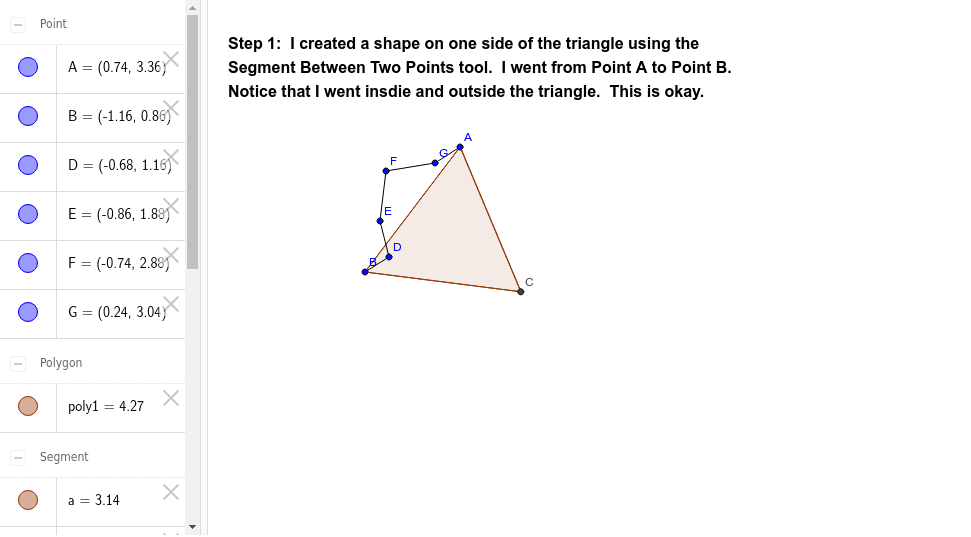
Loading the math board and drawing, please wait…
In collections
Tessellation from Triangle using Rotation
This example demonstrates how to construct plane figures through rotating triangles. Core math concepts include rotation, integral calculus, upper and lower sum or Riemann sum, general quadrilateral, arithmetic operations, and indefinite integral. Construction highlights Polygon and Segment commands from GeoGebra as per the summary. Suitable for high school mathematics teaching, illustrating the combination of geometric transformations and integral concepts.
GeoGebra Commands & Parameters
Polygon(A, B, 3) → poly1, a, b, c, CSegment(B, D) → dSegment(D, E) → eSegment(E, F) → fSegment(F, G) → gSegment(G, A) → h
AI Drawing Prompt Reference
Draw a triangle and extend two sides from the midpoint of one side, making them parallel to the other two sides to form a quadrilateral. Connect one vertex of the quadrilateral to the opposite vertex of the triangle, creating a new triangle. Rotate this new triangle 180 degrees to form a tessellated pattern with the original triangle, demonstrating rotational symmetry in the plane.
The prompt above was compiled from the original drawing commands and is for reference only.