
Template for Arranging Two Similar Triangles
Loading the math board and drawing, please wait…
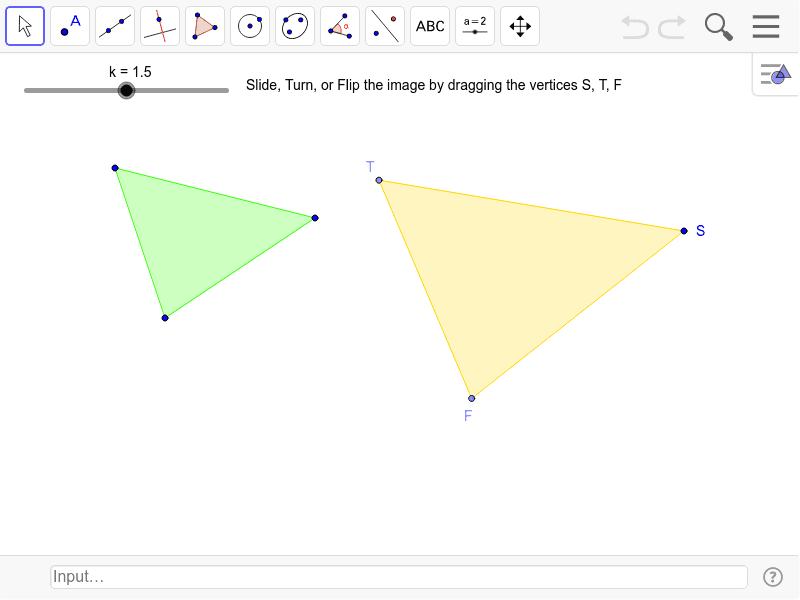
This example demonstrates the arrangement of two similar triangles. It involves the concept of similar triangles and is constructed using GeoGebra commands such as Polygon, Dilate, Vector, Translate, etc. Suitable for students at the middle school level and above to learn about the properties and transformations of similar triangles.
GeoGebra Commands & Parameters
Polygon(A, B, C) → poly1, c, a, bDilate(A, k, D) → A'Dilate(B, k, D) → B'Dilate(C, k, D) → C'Polygon(A', B', C') → poly1', c', a', b'Vector(C', S) → uTranslate(A', u) → A''Translate(B', u) → B''Translate(C', u) → C''Polygon(A'', B'', C'') → poly1'', c'', a'', b''Circle(S, B'') → dPoint(d) → TAngle(B'', S, T) → αRotate(A'', α, S) → A'''Rotate(B'', α, S) → B'''Rotate(C'', α, S) → C'''Polygon(A''', B''', C''') → poly1''', c''', a''', b'''Mirror(A''', a''') → ESegment(A''', E) → ePoint(e) → FPolygon(S, F, T) → poly2, r, s, f
AI Drawing Prompt Reference
Draw two similar triangles. First, construct triangle ABC. Then, dilate triangle ABC with D as the center to get A'B'C'. Next, use C' as the starting point to construct vector u and translate A', B', C' along u to get A'', B'', C'', forming triangle A''B''C''. Then, draw a circle with B'' as the center and B'' as the radius, and let it intersect at point T. Connect B''T and extend it to intersect the opposite side of A''. Finally, construct triangle SFT with S as the vertex and F, T as the base endpoints.
The prompt above was compiled from the original drawing commands and is for reference only.