
Tangram Geometry with Rotations and Constructions
Loading the math board and drawing, please wait…
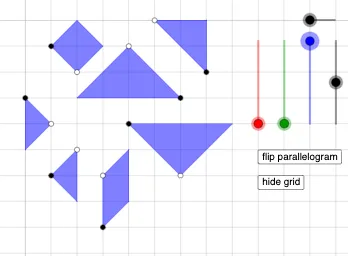
This example demonstrates how a tangram (seven-piece) set can be constructed and rearranged to form a target shape by explicitly building the pieces from geometric primitives. It focuses on visualizing the relationships among triangle pieces through accurate geometric construction. Key concepts include geometric construction (creating points/lines/segments and polygonal regions), right-triangle structure, and geometric transformations—especially rotation—to move pieces while maintaining their identities. Construction-wise, it uses Circle, Point, Line, Ray, and Segment to establish reference geometry; OrthogonalLine to create perpendicular constraints that support right-triangle features; Intersect to compute crucial vertices where edges meet; Polygon to assemble the tangram pieces; and Rotate to transform pieces into new positions for the拼合 (assembly) effect. The model maintains a vertex-driven workflow: many named objects correspond to original points and their rotated/derived counterparts (e.g., indexed variants like a_1, b_3, c_1, d_1, etc.). Suitable for school-level geometry learning and exploratory math activities emphasizing transformations, decomposition, and reassembly of planar figures.
GeoGebra Commands & Parameters
Circle(A, a) → cPoint(c) → BLine(A, B) → fOrthogonalLine(B, f) → g_{4}Circle(B, A) → dIntersect(d, g_{4}, 2) → CPolygon(A, B, C) → t1, c_1, a_1, b_{3}Circle(D, a) → ePoint(e) → ELine(D, E) → hOrthogonalLine(E, h) → iCircle(E, D) → kIntersect(k, i, 2) → FPolygon(D, E, F) → t2, f_1, d_1, e_1Circle(G, a / 2) → pPoint(p) → HLine(G, H) → jOrthogonalLine(H, j) → lCircle(H, G) → qIntersect(q, l, 2) → IOrthogonalLine(G, j) → mOrthogonalLine(I, m) → nIntersect(m, n) → JPolygon(G, H, I, J) → q1, g_1, h_1, i_1, j_1Circle(N, a / 2) → p_1Point(p_1) → OLine(N, O) → n_1OrthogonalLine(O, n_1) → q_1Circle(O, N) → r_1Intersect(r_1, q_1, 1) → PPolygon(O, N, P) → t4, p_2, o_1, n_2Circle(Q, (sqrt(2) / 2 * a)) → s_1Point(s_1) → RLine(Q, R) → t_1Rotate(R, ((-π)) / 4, Q) → R'Rotate(R, π / 4, Q) → R'_{1}Ray(Q, R') → b_1Circle(Q, a / 2) → d_2Intersect(d_2, b_1, 1) → SLine(S, t_1) → f_2Circle(S, (sqrt(2) / 2 * a)) → c_2Intersect(c_2, f_2, 2) → TPolygon(Q, S, T, R) → q2, q_2, s_2, t_2, r_2Ray(Q, R'_{1}) → g_2Intersect(d_2, g_2, 1) → ULine(U, t_1) → h_2Circle(U, (sqrt(2) / 2 * a)) → e_2Intersect(e_2, h_2, 2) → VPolygon(Q, R, V, U) → q3, q_3, r_3, v, uPoint(Circle[W, a / 2]) → ZSegment(W, Z) → i_2Rotate(Z, ((-π)) / 2, W) → Z'Polygon(Z, W, Z') → t5, z', z_1, wPoint(Circle[A_1, a]) → B_1Segment(A_1, B_1) → j_2Rotate(B_1, ((-π)) / 4, A_1) → C_1Rotate(A_1, π / 4, B_1) → D_1Ray(B_1, D_1) → m_2Ray(A_1, C_1) → a_2Intersect(m_2, a_2) → E_1Polygon(B_1, A_1, E_1) → t6, b_2, f_3, g_3If(o ≟ 1, (sqrt(2) / 32 * a), o ≟ 2, a / 32) → r_{4}
AI Drawing Prompt Reference
Draw a tangram set composed of seven pieces, including right triangles and a square. Start by constructing a circle with a given center, pick a point on it, draw a line through the center and that point, then construct a perpendicular line through the point to intersect another circle, forming the third vertex of a right isosceles triangle. Repeat similar steps to create a second congruent right triangle and a small square. Then, construct a smaller right triangle and a parallelogram via rotation. Finally, use rotations and intersections to build two larger triangles, and assemble all polygons into the complete tangram shape.
The prompt above was compiled from the original drawing commands and is for reference only.