
Tangram Challenges: Constructing a Puzzle Shape via Rotation
Loading the math board and drawing, please wait…
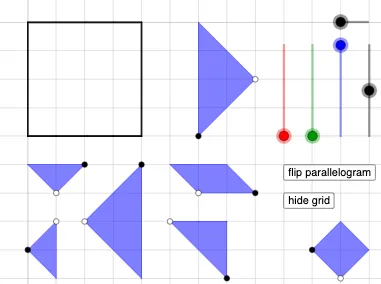
This example demonstrates how to build a tangram-style puzzle configuration in GeoGebra by constructing key points from circles and lines, then assembling the final picture using geometric transforms. It focuses on geometric construction workflows: creating circles and baseline lines, finding intersections to determine vertices, using orthogonal helper lines to fix triangle placement, and forming polygons that represent the assembled regions. The underlying math includes standard geometry tools (circle/line/segment/ray), intersection-based construction (Intersect), orthogonal construction (OrthogonalLine), polygon composition (Polygon), and especially rotation-driven transformation (Rotate) to generate multiple congruent triangle parts and align them into the target tangram challenge. The construction uses conditional logic (If) to manage object creation or visibility. Suitable for middle school through early university students, and ideal for instruction and exploration of geometry construction and transformation-based reasoning.
GeoGebra Commands & Parameters
Circle(A, a) → cPoint(c) → BLine(A, B) → fOrthogonalLine(B, f) → g_{4}Circle(B, A) → dIntersect(d, g_{4}, 2) → CPolygon(A, B, C) → t1, c_1, a_1, b_{3}Circle(D, a) → ePoint(e) → ELine(D, E) → hOrthogonalLine(E, h) → iCircle(E, D) → kIntersect(k, i, 2) → FPolygon(D, E, F) → t2, f_1, d_1, e_1Circle(G, a / 2) → pPoint(p) → HLine(G, H) → jOrthogonalLine(H, j) → lCircle(H, G) → qIntersect(q, l, 2) → IOrthogonalLine(G, j) → mOrthogonalLine(I, m) → nIntersect(m, n) → JPolygon(G, H, I, J) → q1, g_1, h_1, i_1, j_1Circle(N, a / 2) → p_1Point(p_1) → OLine(N, O) → n_1OrthogonalLine(O, n_1) → q_1Circle(O, N) → r_1Intersect(r_1, q_1, 1) → PPolygon(O, N, P) → t4, p_2, o_1, n_2Circle(Q, (sqrt(2) / 2 * a)) → s_1Point(s_1) → RLine(Q, R) → t_1Rotate(R, ((-π)) / 4, Q) → R'Rotate(R, π / 4, Q) → R'_{1}Ray(Q, R') → b_1Circle(Q, a / 2) → d_2Intersect(d_2, b_1, 1) → SLine(S, t_1) → f_2Circle(S, (sqrt(2) / 2 * a)) → c_2Intersect(c_2, f_2, 2) → TPolygon(Q, S, T, R) → q2, q_2, s_2, t_2, r_2Ray(Q, R'_{1}) → g_2Intersect(d_2, g_2, 1) → ULine(U, t_1) → h_2Circle(U, (sqrt(2) / 2 * a)) → e_2Intersect(e_2, h_2, 2) → VPolygon(Q, R, V, U) → q3, q_3, r_3, v, uPoint(Circle[W, a / 2]) → ZSegment(W, Z) → i_2Rotate(Z, ((-π)) / 2, W) → Z'Polygon(Z, W, Z') → t5, z', z_1, wPoint(Circle[A_1, a]) → B_1Segment(A_1, B_1) → j_2Rotate(B_1, ((-π)) / 4, A_1) → C_1Rotate(A_1, π / 4, B_1) → D_1Ray(B_1, D_1) → m_2Ray(A_1, C_1) → a_2Intersect(m_2, a_2) → E_1Polygon(B_1, A_1, E_1) → t6, b_2, f_3, g_3If(o ≟ 1, (sqrt(2) / 32 * a), o ≟ 2, a / 32) → r_{4}Point(Circle[K, (a * sqrt(2))]) → LSegment(K, L) → k_1Polygon(K, L, 4) → poly1, l_1, m_1, k_2, l_2, M, F_1
AI Drawing Prompt Reference
Draw a tangram-style puzzle shape. Start by creating a circle with a given radius, pick a point on it, draw a line from the center to that point, then construct a perpendicular line through that point; the intersection with the circle gives a third vertex, forming an isosceles right triangle. Repeat this process elsewhere to make a second congruent triangle. Next, construct a square with side length half the radius, using perpendicular lines and intersections to define its four vertices. Then, create a smaller isosceles right triangle, and a quadrilateral formed by rotating a radius endpoint by 45 degrees, drawing rays to intersect a circle, and connecting the resulting points. Finally, assemble all polygons into the complete tangram configuration.
The prompt above was compiled from the original drawing commands and is for reference only.