
Tangent Circles and Dynamic Illustration
Loading the math board and drawing, please wait…
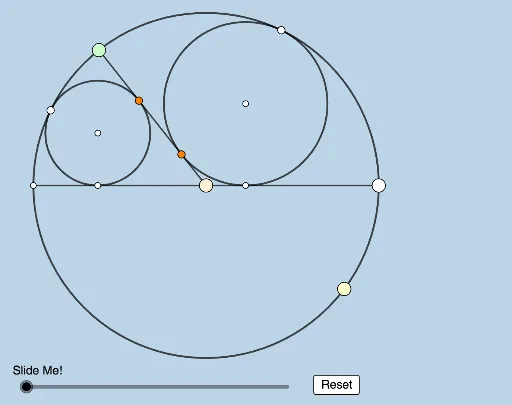
This example dynamically illustrates a problem involving tangent circles posted by Antonio Gutierrez. Key mathematical concepts include the properties of circles and the definition of tangents. Using GeoGebra commands such as Circle, Point, Ray, Intersect, Semicircle, Segment, Angle, Rotate, Line, OrthogonalLine, Dilate, Vector, Translate, and Polygon, the illustration can be modified and observed. Suitable for high school geometry learners and educators.
GeoGebra Commands & Parameters
Circle(O, B_1) → cPoint(c) → ARay(A, O) → fIntersect(c, f, 2) → G_1Semicircle(G_1, A) → dPoint(d) → BSegment(B, O) → gSegment(O, A) → hAngle(A, O, B) → αRotate(A, (0.5 * α), O) → CRay(O, C) → iLine(B, A) → jIntersect(j, i) → DCircle(C, O) → eCircle(A, C) → kLine(A, O) → nCircle(C, Segment[O, A]) → pCircle(A, Segment[A, O]) → qIntersect(p, q, 1) → ELine(A, E) → lCircle(E, Segment[A, D]) → rIntersect(r, l, 2) → FLine(F, C) → mIntersect(n, m) → GLine(E, G) → sIntersect(s, i) → HCircle(H, C) → tRotate(B, (π - α) / 2, O) → B'Angle(B, O, B') → βRay(O, B') → aSegment(B, G_1) → bIntersect(a, b) → ICircle(G_1, Segment[G_1, O]) → c_1Circle(B, Segment[G_1, O]) → d_1Circle(B, Segment[O, B]) → e_1Circle(B', Segment[O, B]) → f_1Intersect(e_1, f_1, 2) → JLine(B, J) → g_1Circle(J, Segment[B, I]) → h_1Intersect(h_1, g_1, 2) → KRay(B, O) → i_1Ray(K, B') → j_1Intersect(i_1, j_1) → LRay(L, J) → k_1Intersect(a, k_1) → MCircle(M, B') → p_1OrthogonalLine(M, n) → l_1OrthogonalLine(H, n) → m_1OrthogonalLine(M, g) → n_1OrthogonalLine(H, g) → q_1Intersect(l_1, n) → NIntersect(m_1, n) → PIntersect(g, q_1) → QIntersect(n_1, g) → RLine(C, P) → r_1Line(B, G_1) → s_1Line(B', N) → t_1Intersect(s_1, t_1) → SLine(B, A) → a_1Intersect(r_1, a_1) → TDilate(B, If[0 < v ≤ 1, 1 - v, 0], G_1) → B'_1Segment(B, B'_1) → b_1Dilate(B', If[1 < v ≤ 2, 2 - v, 0], S) → B''Segment(B', B'') → f_2Dilate(S, If[2 < v ≤ 3, 3 - v, 0], N) → S'Segment(S, S') → g_2Dilate(B, If[3 < v ≤ 4, 4 - v, 0], A) → B'_2Segment(B, B'_2) → h_2Dilate(C, If[4 < v ≤ 5, 5 - v, 0], T) → C'Segment(C, C') → i_2Dilate(T, If[5 < v ≤ 6, 6 - v, 0], P) → T'Segment(T, T') → j_2Dilate(S, If[7 < v ≤ 8, 8 - v, 0], R) → S'_1Segment(S, S'_1) → k_2Dilate(R, If[8 < v ≤ 9, 9 - v, 0], T) → R'Segment(R, R') → l_2Dilate(S, If[9 < v ≤ 10, 10 - v, 0], Q) → S'_2Vector(S, S'_2) → wTranslate(S, w) → S'_3Translate(S'_1, w) → USegment(S'_3, U) → m_2Dilate(R, If[10 < v ≤ 11, 11 - v, 0], S) → R'_1Vector(R, R'_1) → u_1Translate(R, u_1) → R'_2Translate(R', u_1) → R''Segment(R'_2, R'') → n_2Polygon(S, Q, T, R) → q1, s_2, q_2, t_2, r_2Segment(G_1, A) → p_2
AI Drawing Prompt Reference
Draw two tangent circles with one circle's center moving on the circumference of the other, dynamically illustrating their relationship. Start with a circle and a ray intersecting it. Create a semicircle with the intersection point as the center. Rotate the ray around this point to get a new center, then draw corresponding circles and rays. Repeat the process with intersection points, rotations, and new circles to form a series of tangent circles. Finally, connect key points with lines, auxiliary lines, and new circles to show the dynamic changes and geometric relationships.
The prompt above was compiled from the original drawing commands and is for reference only.