
Symmetry Challenge #4: Polygon Mirror Reflection
Loading the math board and drawing, please wait…
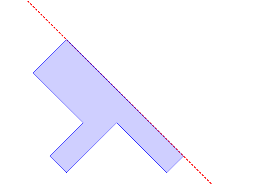
This GeoGebra example demonstrates axial symmetry by reflecting a polygon across a given straight line using the Mirror command. Core mathematical concepts include reflection transformation, polygon properties, angle relationships, and point-line incidence. The construction employs the Line command to define the axis of symmetry a, Point to create vertices such as A and B, Polygon to build the original polygon poly1, and Mirror to generate the reflected points C′ through J′ and their corresponding image objects. It is suitable for middle and high school geometry instruction, supporting inquiry into symmetry invariants and serving as a hands-on introduction to GeoGebra geometric construction.
GeoGebra Commands & Parameters
Line(A, B) → aPoint(a) → CPoint(a) → JPolygon(C, D, E, F, G, H, I, J) → poly1, c, d, e, f, g, h, i, jMirror(C, a) → C'Mirror(D, a) → D'Mirror(E, a) → E'Mirror(F, a) → F'Mirror(G, a) → G'Mirror(H, a) → H'Mirror(I, a) → I'Mirror(J, a) → J'
AI Drawing Prompt Reference
Draw an octagon and reflect it across a straight line. First, draw a line as the axis of symmetry. Then, place eight points on the line to form the vertices of the octagon. Next, mirror each of these points across the line to create the reflected octagon.
The prompt above was compiled from the original drawing commands and is for reference only.