
Plane Intersecting a Triangular Pyramid
Loading the math board and drawing, please wait…
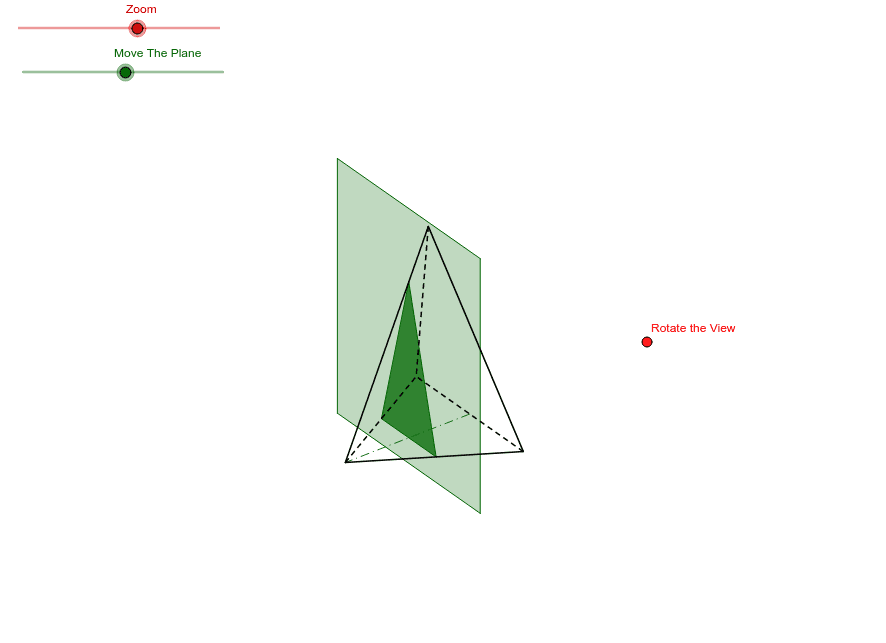
This example demonstrates the intersection of a plane with a triangular pyramid, involving core concepts like planes, solid geometry, volume calculation, and linear functions. It is constructed using GeoGebra commands such as Vector, OrthogonalLine, Translate, Line, Polygon, Midpoint, Segment, etc., suitable for high school geometry instruction and exploratory learning.
GeoGebra Commands & Parameters
Vector(B_1, X) → u_1Vector(B_1, Z) → w_1OrthogonalLine(Uchwyt, yAxis) → aOrthogonalLine(Uchwyt, xAxis) → bVector(B_1, Y) → v_1Translate(O, w_1) → GLine(O, G) → eTranslate(O, u_1) → KTranslate(O, v_1) → NVector(O, G) → vVector(O, K) → uVector(O, N) → wTranslate(N, u) → Z1If(m < 2 / 3, ((1 - (1.5 * m)) * A1) + ((1.5 * m) * S), ((1 - (3 * n)) * S) + ((3 * n) * A3)) → B3If(m < 2 / 3, ((1 - (1.5 * m)) * A1) + ((1.5 * m) * S), ((1 - (3 * n)) * S) + ((3 * n) * A2)) → B4Polygon(B2, B1, B4, B3) → poly1, b2, b1, b4, b3Polygon(E4, E1, E2, E3) → poly2, e4, e1, e2, e3Midpoint(A2, A3) → ASegment(A, A1) → pOdcinek3D(S, A2, A1, A3) → d, fOdcinek3D(S, A3, A2, A1) → h, iOdcinek3D(S, A1, A3, A2) → j, lOdcinek3D(A1, A2, A3, S) → q, rOdcinek3D(A1, A3, S, A2) → s, tOdcinek3D(A2, A3, A1, S) → a_1, b_1
AI Drawing Prompt Reference
Draw a triangular pyramid and a plane intersecting it, demonstrating the intersection. Construct the base and vertices of the pyramid, then draw a plane parallel to the base. The plane intersects the pyramid's lateral faces, forming new triangular sections. Connect the pyramid's apex to the base vertices with lines, and label key points and segments to show the geometric relationships and construction steps.
The prompt above was compiled from the original drawing commands and is for reference only.