
Tetris Geometric Models
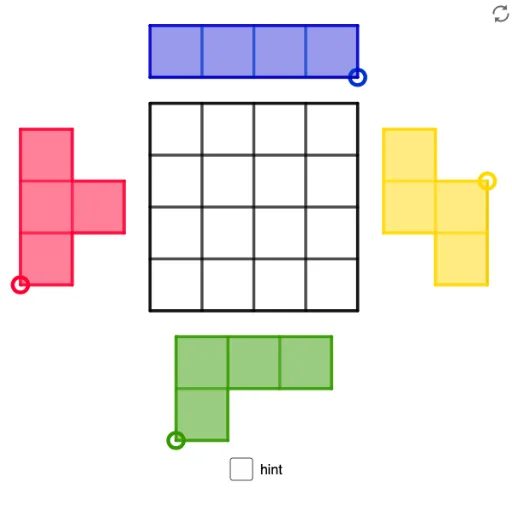
Loading the math board and drawing, please wait…
This example demonstrates 3D geometric models constructed with GeoGebra, including various polygon and solid shape combinations, suitable for 3D printing. It involves core math concepts like solid geometry, polygon construction, fractions, cosine theorem, and plane figures. Key GeoGebra commands used include Intersect, Polygon, Midpoint, Segment, Point, and Circle. Ideal for high school and above students learning solid geometry and 3D modeling design.
GeoGebra Commands & Parameters
Intersect(xAxis, yAxis) → APolygon(A, B, 4) → poly1, f, g, h, i, C, DMidpoint(D, A) → EMidpoint(A, B) → FMidpoint(B, C) → GMidpoint(C, D) → HMidpoint(H, D) → IMidpoint(D, E) → JMidpoint(E, A) → KMidpoint(A, F) → LMidpoint(F, B) → MMidpoint(B, G) → NMidpoint(G, C) → OMidpoint(C, H) → PSegment(I, L) → jSegment(H, F) → kSegment(P, M) → lSegment(J, O) → mSegment(E, G) → nSegment(K, N) → pPolygon(A, L, 4) → poly2, q, r, s, t, Q, RPolygon(F, M, 4) → poly3, a, b, c, d, S, TPolygon(Q, T, 4) → poly4, e, f_1, g_1, h_1, U, VPolygon(E, V, 4) → poly5, i_1, j_1, k_1, l_1, W, ZPolygon(I, W, 4) → poly6, m_1, n_1, p_1, q_1, A_1, B_1Polygon(A_1, U, 4) → poly7, r_1, s_1, t_1, a_1, C_1, D_1Polygon(C_1, S, 4) → poly8, b_1, c_1, d_1, e_1, E_1, F_1Polygon(P, D_1, 4) → poly9, f_2, g_2, h_2, i_2, G_1, H_1Point(Circle[I_1, 2]) → J_1Segment(I_1, J_1) → j_2Midpoint(j_2) → K_1Polygon(I_1, K_1, 4) → whiteS2, k_2, l_2, m_2, n_2, L_1, M_1Polygon(K_1, J_1, 4) → poly11, p_2, q_2, r_2, s_2, N_1, O_1Polygon(L_1, N_1, 4) → whiteS1, t_2, a_2, b_2, c_2, P_1, Q_1Polygon(P_1, N_1, 4) → poly13, d_2, e_2, f_3, g_3, R_1, S_1Polygon(I_1, J_1, N_1, R_1, S_1, Q_1, L_1, M_1) → Sborder_0, i_3, j_3, n_3, r_3, s_3, q_3, l_3, m_3Polygon(M_1, I_1, J_1, N_1, R_1, S_1, Q_1, L_1) → Sborder_2, m_4, i_4, j_4, n_4, r_4, s_4, q_4, l_4Segment(L_1, K_1) → h_3Segment(P_1, N_1) → k_3Segment(L_1, N_1) → p_3Point(Circle[T_1, 2]) → U_1Segment(T_1, U_1) → t_3Midpoint(t_3) → V_1Polygon(T_1, V_1, 4) → poly10, a_3, b_3, c_3, d_3, W_1, Z_1Polygon(V_1, U_1, 4) → whiteL1, e_3, f_4, g_4, h_4, A_2, B_2Polygon(Z_1, W_1, 4) → whiteL2, k_4, p_4, t_4, a_4, C_2, D_2Polygon(D_2, C_2, 4) → poly15, b_4, c_4, d_4, e_4, E_2, F_2Polygon(F_2, T_1, U_1, A_2, W_1, E_2) → Lborder_0, f_5, t_5, u_1, a_5, w_1, e_5Segment(D_2, C_2) → g_5Segment(Z_1, W_1) → h_5Segment(W_1, V_1) → i_5Polygon(F_2, T_1, U_1, A_2, W_1, E_2) → Lborder_2, f_6, t_6, u_2, a_6, w_2, e_6Point(Circle[G_2, 3]) → H_2Segment(G_2, H_2) → j_5Circle(G_2, 1) → c_5Circle(H_2, 1) → d_5Intersect(c_5, j_5, 1) → I_2Intersect(d_5, j_5, 1) → J_2Polygon(G_2, I_2, 4) → poly14, k_5, l_5, m_5, n_5, K_2, L_2Polygon(I_2, J_2, 4) → whiteT1, p_5, q_5, r_5, s_5, M_2, N_2Polygon(J_2, H_2, 4) → poly17, b_5, g_6, h_6, i_6, O_2, P_2Polygon(K_2, M_2, 4) → poly18, j_6, k_6, l_6, m_6, Q_2, R_2Polygon(G_2, H_2, O_2, M_2, Q_2, R_2, K_2, L_2) → Tborder_0, g_7, h_7, o_2, m_7, q_6, r_6, k_7, l_7Segment(K_2, I_2) → n_6Segment(K_2, M_2) → p_6Segment(M_2, J_2) → s_6Polygon(G_2, H_2, O_2, M_2, Q_2, R_2, K_2, L_2) → Tborder_2, g_8, h_8, o_1, m_8, q_7, r_7, k_8, l_8Point(Circle[S_2, 4]) → T_2Segment(S_2, T_2) → b_6Midpoint(b_6) → U_2Midpoint(S_2, U_2) → V_2Midpoint(U_2, T_2) → W_2Polygon(S_2, V_2, 4) → whiteI1, c_6, d_6, f_7, i_7, Z_2, A_3Polygon(V_2, U_2, 4) → poly19, j_7, n_7, p_7, s_7, B_3, C_3Polygon(U_2, W_2, 4) → whiteI2, t_7, a_7, b_7, c_7, D_3, E_3Polygon(W_2, T_2, 4) → Iborder_1, d_7, e_7, f_8, i_8, F_3, G_3Polygon(A_3, S_2, T_2, F_3) → Iborder_0, a_8, s_8, t_8, f_9Segment(Z_2, V_2) → j_8Segment(B_3, U_2) → n_8Segment(D_3, W_2) → p_8Polygon(A_3, S_2, T_2, F_3) → Iborder_2, a_9, s_9, t_9, f_{10}