
Surface Wave Simulation
Loading the math board and drawing, please wait…
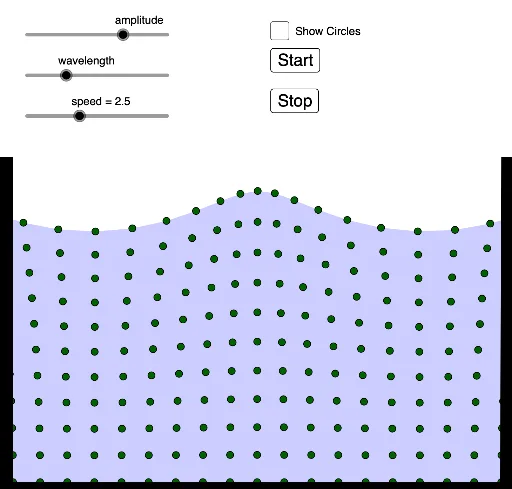
This example demonstrates the propagation of surface waves, dynamically simulating waveforms to show the relationship between amplitude, wavelength, and speed. Core math concepts include trigonometry, sequences, coordinate geometry, and geometric construction. Construction highlights use of GeoGebra commands like Sequence, Polygon, and Point, with sliders for parameter control. Suitable for high school physics and mathematics teaching on wave theory and parametric modeling.
GeoGebra Commands & Parameters
Sequence(Sequence[Rotate[(bbb, aaa + aaa^(2) / (500 / amplitude)), t + (bbb * (21 - wavelength)), (bbb, aaa)], aaa, 0, 10, 1], bbb, 0, 20, 1) → l1Polygon(l1(1, 1), l1(21, 1), l1(13, 11), l1(12, 11), l1(11, 11), l1(10, 11), l1(9, 11), l1(8, 11), l1(7, 11), l1(6, 11), l1(5, 11), l1(4, 11), l1(21, 11), l1(3, 11), l1(2, 11), l1(1, 11), l1(1, 1), l1(20, 11), l1(19, 11), l1(18, 11), l1(17, 11), l1(16, 11), l1(15, 11), l1(14, 11)) → poly1, f, p, q, r, s, b, c, d, e, f_1, g_1, g, h_1, i_1, j_1, k_1, l_1, h, i, j, k, l, m, nPoint(xAxis) → HPolygon(E, F, G, H) → q1, e_1, f_2, g_2, h_2Point(f) → IPolygon(I, J, K, L) → q2, i_2, j_2, k_2, l_2Polygon(M, N, O, P) → q3, m_1, n_1, o, p_1
AI Drawing Prompt Reference
Draw a dynamic simulation of surface wave propagation. First, create a series of rotated points to represent the wave propagation. Then, use these points to construct polygons to simulate the wave shape. Next, create a point on the x-axis to represent the wave's starting point. Finally, use these polygons and points to demonstrate the wave's propagation process, including wave crests and troughs.
The prompt above was compiled from the original drawing commands and is for reference only.