
Pursuit Curves Rose
Loading the math board and drawing, please wait…
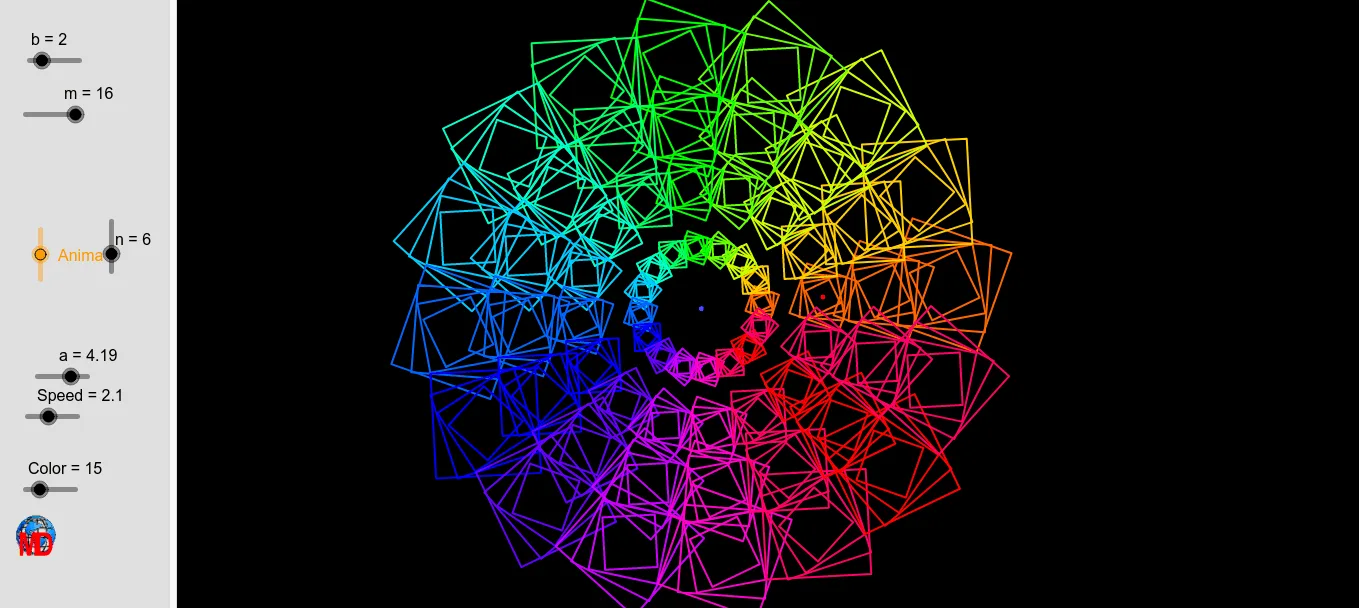
This example demonstrates the formation of a rose pattern through pursuit curves, created by the motion trajectories of multiple points following specific rules. Key mathematical concepts include parametric equations, coordinate geometry, rotation, and sequence generation. The construction utilizes GeoGebra commands such as Circle, Point, Rotate, Polygon, Centroid, Sequence, and Element. Suitable for high school and above mathematics learners to understand parametric equations and locus plotting.
GeoGebra Commands & Parameters
Circle(A, R) → cPoint(c) → BRotate(B, 90°, A) → B'Polygon(B, B', 4) → poly1, g, h, i, j, C, DCentroid(poly1) → ESequence(Dilate[Rotate[poly1, (i * π / ((2 * n))) + a, E], (n - i) / n, E], i, 0, k) → l1Sequence(Dilate[l1, i, F], i, 0.5, b, 0.5) → l2Sequence(Rotate[l2, i, F], i, 0, (2 * π), (2 * π / m)) → l3Element(l3, A1) → B1Element(l3, A2) → B2Element(l3, A3) → B3Element(l3, A4) → B4Element(l3, A5) → B5Element(l3, A6) → B6Element(l3, A7) → B7Element(l3, A8) → B8Element(l3, A9) → B9Element(l3, A10) → B10Element(l3, A11) → B11Element(l3, A12) → B12Element(l3, A13) → B13Element(l3, A14) → B14Element(l3, A15) → B15Element(l3, A16) → B16
AI Drawing Prompt Reference
Draw a rose pattern formed by the motion trajectories of multiple points following specific rules, where the points rotate around a central point and gradually move away, creating petal-like structures. Start by drawing a circle, then take a point on the circle and rotate it 90 degrees to get another point. Form a quadrilateral using these two points and two additional points. Calculate the centroid of the quadrilateral and generate a sequence of scaled and rotated copies of the quadrilateral based on this centroid. These copies are further scaled and rotated to create a complex rose pattern.
The prompt above was compiled from the original drawing commands and is for reference only.