
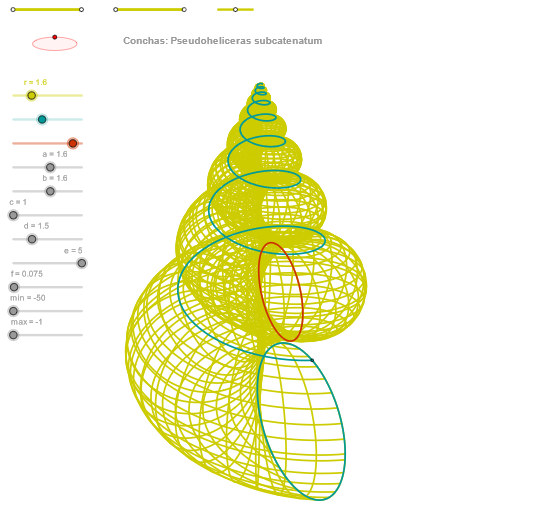
Concha (Pseudoheliceras subcatenatum) Geometric Construction
Loading the math board and drawing, please wait…
In collections
geometriadinamica.es
① This example demonstrates how to construct a spiral shell-like figure named 'Concha (Pseudoheliceras subcatenatum)' in GeoGebra, resembling the coiled shell of an ammonite fossil. ② The core mathematical concepts involve parametric curves, trigonometric functions, geometric transformations (such as orthogonal lines, circles, ellipses), and sequence generation, combining multiple auxiliary points and curve commands to produce a complex spiral structure. ③ Construction highlights: from the construction summary, commands such as Segment, Point, OrthogonalLine, Circle, Intersect, Ellipse, Angle, CurveCartesian, and Sequence are used, with numerous objects (e.g., v10, p, v20, Q4, Q3, etc.) defined to progressively build the spiral skeleton and fill in details. ④ Suitable for high school to university-level math enthusiasts or geometry drawing learners, this example is useful for exploring parametric equations, curve family generation, and mathematical simulation of biological forms, as well as a comprehensive practice case for advanced GeoGebra commands.
GeoGebra Commands & Parameters
Segment(Q3, Q4) → p2Point(p2) → P3Segment(P3, Q4) → p4Point(p4) → P4Segment(Q1, Q2) → p1Point(p1) → P1Segment(P1, Q2) → p3Point(p3) → P2OrthogonalLine(C, yAxis) → zz1Circle(C, 0.62) → zz0Intersect(zz0, zz1, 1) → ZZ1Intersect(zz0, zz1, 2) → ZZ2Ellipse(ZZ1, ZZ2, 0.65) → zElipse1Intersect(zElipse1, zz1) → ZZ5, ZZ6Point(zElipse1) → XYAngle(ZZ6, C, XY) → zAngRotOrthogonalLine(C, xAxis) → zz2Intersect(zz0, zz2, 2) → ZZ3Intersect(zz0, zz2, 1) → ZZ4Ellipse(ZZ3, ZZ4, 0.65) → zElipse2Intersect(zElipse2, zz2) → ZZ7, ZZ8Point(zElipse2) → ZAngle(ZZ8, C, Z) → zAngIncSegment(Q5, Q6) → p5Point(p5) → P5Segment(ZZ5, ZZ6) → zz4Segment(ZZ7, ZZ8) → zz3Intersect(zElipse2, zElipse1, 1) → zPunto1Intersect(zElipse2, zElipse1, 4) → zPunto2Segment(zPunto1, zPunto2) → zSeg2CurveCartesian((r * ((((exp((f * u)) * (d + (a * cos(α)))) * cos((c * u))) * sin(zAngRot)) + (((exp((f * u)) * (d + (a * cos(α)))) * sin((c * u))) * cos(zAngRot)))), (r * ((((((-exp((f * u))) * (d + (a * cos(α)))) * cos((c * u))) * cos(zAngRot)) * sin(zAngInc)) + ((((exp((f * u)) * (d + (a * cos(α)))) * sin((c * u))) * sin(zAngRot)) * sin(zAngInc)) + ((exp((f * u)) * ((-1.4 * e) + (b * sin(α)))) * cos(zAngInc)))) + 6, u, u1, u2) → curva2CurveCartesian((r * ((((exp((f * β)) * (d + (a * cos(v)))) * cos((c * β))) * sin(zAngRot)) + (((exp((f * β)) * (d + (a * cos(v)))) * sin((c * β))) * cos(zAngRot)))), (r * ((((((-exp((f * β))) * (d + (a * cos(v)))) * cos((c * β))) * cos(zAngRot)) * sin(zAngInc)) + ((((exp((f * β)) * (d + (a * cos(v)))) * sin((c * β))) * sin(zAngRot)) * sin(zAngInc)) + ((exp((f * β)) * ((-1.4 * e) + (b * sin(v)))) * cos(zAngInc)))) + 6, v, v1, v2) → a1CurveCartesian((r * ((((exp((f * max)) * (d + (a * cos(v)))) * cos((c * max))) * sin(zAngRot)) + (((exp((f * max)) * (d + (a * cos(v)))) * sin((c * max))) * cos(zAngRot)))), (r * ((((((-exp((f * max))) * (d + (a * cos(v)))) * cos((c * max))) * cos(zAngRot)) * sin(zAngInc)) + ((((exp((f * max)) * (d + (a * cos(v)))) * sin((c * max))) * sin(zAngRot)) * sin(zAngInc)) + ((exp((f * max)) * ((-1.4 * e) + (b * sin(v)))) * cos(zAngInc)))) + 6, v, v1, v2) → curva1Sequence(CurveCartesian[(r * ((((exp((f * u)) * (d + (a * cos(v)))) * cos((c * u))) * sin(zAngRot)) + (((exp((f * u)) * (d + (a * cos(v)))) * sin((c * u))) * cos(zAngRot)))), (r * ((((((-exp((f * u))) * (d + (a * cos(v)))) * cos((c * u))) * cos(zAngRot)) * sin(zAngInc)) + ((((exp((f * u)) * (d + (a * cos(v)))) * sin((c * u))) * sin(zAngRot)) * sin(zAngInc)) + ((exp((f * u)) * ((-1.4 * e) + (b * sin(v)))) * cos(zAngInc)))) + 6, v, v1, v2], u, u1, u2, paso) → list2Sequence(CurveCartesian[(r * ((((exp((f * u)) * (d + (a * cos(v)))) * cos((c * u))) * sin(zAngRot)) + (((exp((f * u)) * (d + (a * cos(v)))) * sin((c * u))) * cos(zAngRot)))), (r * ((((((-exp((f * u))) * (d + (a * cos(v)))) * cos((c * u))) * cos(zAngRot)) * sin(zAngInc)) + ((((exp((f * u)) * (d + (a * cos(v)))) * sin((c * u))) * sin(zAngRot)) * sin(zAngInc)) + ((exp((f * u)) * ((-1.4 * e) + (b * sin(v)))) * cos(zAngInc)))) + 6, u, u1, u2], v, v1, v2, paso) → list1
AI Drawing Prompt Reference
Draw a geometric spiral shell figure resembling an ammonite fossil called Concha. First establish the basic framework: create several line segments in the coordinate system and place multiple moving points on them. Then draw orthogonal lines through the center point C to the y-axis and x-axis, create a circle with radius 0.62 centered at C, and find the four intersection points between the circle and the orthogonal lines. Using these intersection points as foci with eccentricity 0.65, construct two ellipses, then find their intersection points and place points on the ellipses. Measure the angles formed by these points with the center point as rotation parameters. Finally, use complex parametric equations involving exponential and trigonometric functions to draw spiral surface curves, and generate a family of multiple curve layers using sequence commands to create a coiled shell structure with biological morphological characteristics.
The prompt above was compiled from the original drawing commands and is for reference only.