
Electromagnetic Waves 3D Vector Animation
Loading the math board and drawing, please wait…
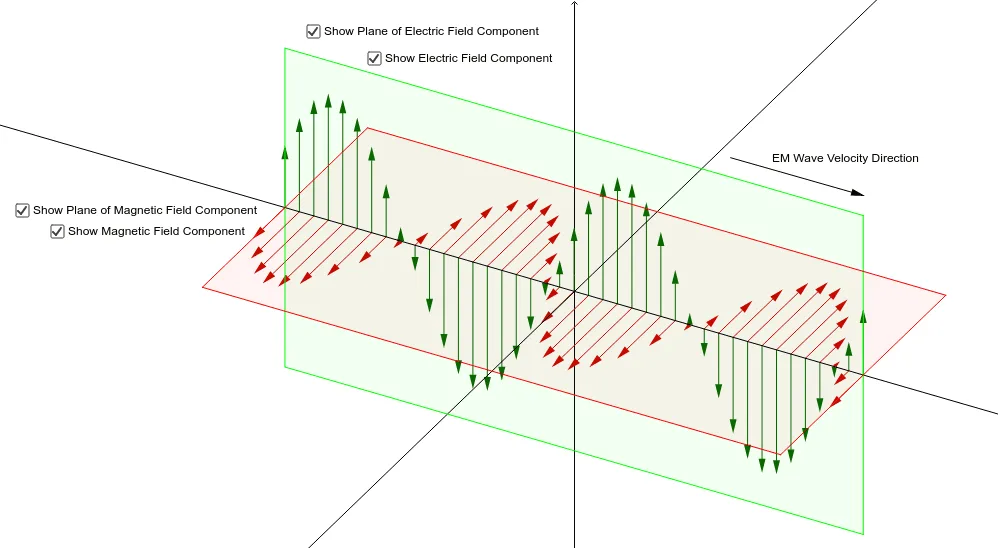
① This GeoGebra example demonstrates the propagation of electromagnetic waves in 3D space, showing the orthogonal oscillation of electric and magnetic fields through animated vectors and polygons. ② Core mathematical concepts include 3D vectors, trigonometric functions (tangent), parametric equations, and continuity, using sinusoidal spatial patterns to model wave behavior. ③ Construction highlights: from the summary, it uses Sequence to generate multiple vectors/points, Polygon to build wave surfaces or cross-sections, Line and Vector to draw directions and field vectors, with sliders (a, w, p) controlling wave number, frequency, and phase for dynamic animation. ④ Suitable for high school or university physics/math courses explaining electromagnetic waves, wave equations, or 3D vector applications; ideal for teacher demonstrations or student exploration of abstract concepts.
GeoGebra Commands & Parameters
Sequence(Vector[(i, i * m), (i, i * m + f(i))], i, -7, 7, 0.35) → list3Sequence(Vector[(i, i * m), (i - 0.5 * f(i), i * m - f(i) / 2)], i, -7, 7, 0.35) → list1Polygon(A_1, A, A_3, A_2) → poly1, a_1, a_2, a_3, a_4Polygon(B, C, E, D) → poly2, b, c, e, d_1Line(F, e) → gVector(G, H) → u
AI Drawing Prompt Reference
Create a 3D animation of electromagnetic wave propagation. Along a slanted straight line, draw a series of equally spaced short arrows representing electric field vectors, with lengths varying sinusoidally to form a wavy pattern. In another set of positions, draw tilted short arrows for magnetic field vectors, perpendicular to the electric field and phase-shifted. Use two quadrilateral polygons to represent the oscillation cross-sections of the electric and magnetic fields, one defined by four vertices and the other by four different points, intersecting or parallel in space. Add a line as the propagation direction reference, and draw a vector from a point to indicate the wave direction or a field vector at a moment. Use sliders to control wave number, frequency, and phase for dynamic animation.
The prompt above was compiled from the original drawing commands and is for reference only.