
Surface of Revolution: x-Axis (3D Glasses)
Loading the math board and drawing, please wait…
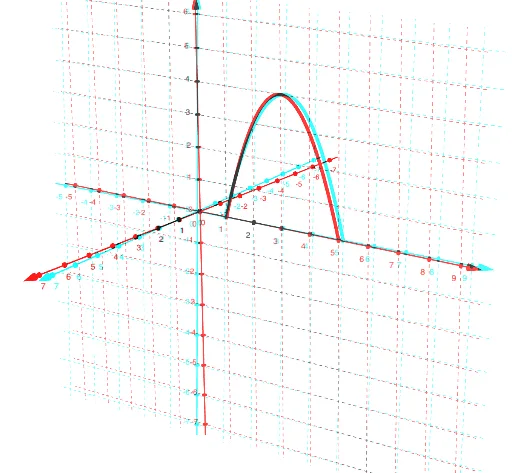
①This GeoGebra example visually demonstrates a surface of revolution created by rotating a function graph around the x-axis, with red-blue 3D glasses effect for enhanced depth perception. ②Core mathematical concepts include surfaces of revolution, function graphs, parametric equations, and 3D coordinate transformations. ③Construction uses the Rotate command to rotate the function f around the x-axis, and the Surface command to generate the surface; objects include f (function), n (slider controlling rotation segments), f_1 (rotated surface), and a (auxiliary). Adjusting slider n changes the smoothness of the surface. ④Suitable for high school or early college students learning solid geometry, calculus (volume/surface area of revolution), and for teachers demonstrating 3D function visualization in class.
GeoGebra Commands & Parameters
Rotate(f, n, xAxis) → f_1Surface(f, n, xAxis) → a
AI Drawing Prompt Reference
Draw a surface of revolution around the x-axis, with a red-blue 3D glasses effect for enhanced depth perception. First, draw the function f, then use slider n to control the number of rotation segments, rotate the function f to generate the rotated surface f_1, and finally use the Surface command to create the surface a. Adjusting slider n changes the smoothness of the surface.
The prompt above was compiled from the original drawing commands and is for reference only.