
GeoGebra's Surface[<curve>, <angle>, <line>] Command: Generating Rotational Surf
Loading the math board and drawing, please wait…
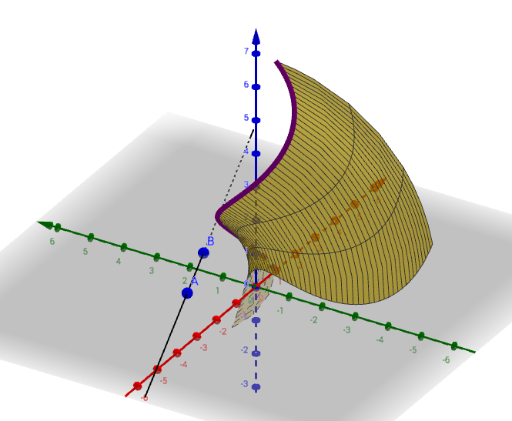
This example demonstrates how to use the GeoGebra command Surface[<curve>, <angle>, <line>] to rotate a planar curve around a given line by a specified angle, thereby creating a 3D rotational surface. The core mathematical concepts include parametric surfaces, solids of revolution, spatial geometry, and the relative positioning of curves and lines. Construction highlights: first define a parametric curve using the CurveCartesian command (object a), and create a line (object b) as the axis of rotation; then invoke the Surface command with the curve, the rotation angle (which can be controlled by a slider), and the axis to generate the surface object f; auxiliary points A and B may also be constructed. This example is suitable for high school or university-level teaching in solid geometry, calculus (e.g., volume of revolution), and mathematical visualization, helping students intuitively understand how rotational surfaces are formed.
GeoGebra Commands & Parameters
CurveCartesian(cos(t), sin(t), t, t, 0, (2 * π)) → aLine(A, B) → fSurface(a, 60°, f) → b