
Surface of Revolution with Helical Cross Section
Loading the math board and drawing, please wait…
In collections
GeoGebra 3D & AR: PreCalc & Calculus Resources
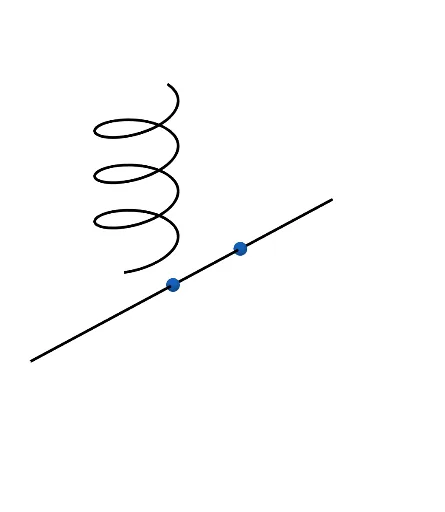
This GeoGebra example illustrates a surface of revolution generated by rotating a helical cross-section around an axis. The surface is dynamic and modifiable, allowing users to explore how changes in parameters affect the 3D shape. Core mathematical concepts include surfaces of revolution, helical curves, parametric equations, and 3D transformations (rotation). The construction employs GeoGebra commands such as Line, CurveCartesian, Surface, and Rotate, with objects h, d, c, g, A, B, f, n, a, b, and a'. It is ideal for high school or undergraduate students studying solid geometry, calculus, or parametric modeling, providing an interactive visual tool to understand the relationship between a generating curve and the resulting surface.
GeoGebra Commands & Parameters
Line(A, B) → fCurveCartesian((g * cos((c * k))), (h * sin((c * k))), (d * k), k, 0, (2 * π)) → aSurface(a, n, f) → bRotate(a, n, f) → a'
AI Drawing Prompt Reference
Create a surface of revolution generated by rotating a helical cross-section around an axis. First, draw a line as the axis of rotation. Then, plot a helical curve above the line using parametric equations. Use the helical curve and the line as parameters to create a surface of revolution. Finally, rotate the helical curve around the line to generate another surface of revolution.
The prompt above was compiled from the original drawing commands and is for reference only.