
Surface Between Two Parametric Curves
Loading the math board and drawing, please wait…
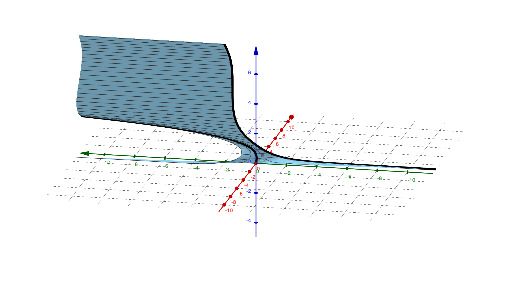
This example demonstrates the surface between two parametric curves. It involves the concepts of parametric equations and surfaces. Using the CurveCartesian and Surface commands, the surface between two parametric curves can be constructed. Suitable for teaching and learning calculus and coordinate geometry.
GeoGebra Commands & Parameters
CurveCartesian(cos(t), ln(t), t, t, 0, 10) → bCurveCartesian(sin(t), t^(3), t, t, 0, 10) → aSurface(((1 - u) * a(t)) + (u * b(t)), u, -1, 1, t, (-4 * π), (4 * π)) → c
AI Drawing Prompt Reference
Draw a surface formed between two parametric curves, first plot the logarithmic curve of cosine and the cubic curve of sine from t=0 to t=10, then generate a smooth surface based on these two curves by varying the parameter u from -1 to 1, demonstrating the relationship between parametric equations and surfaces, suitable for teaching and learning geometry and calculus concepts.
The prompt above was compiled from the original drawing commands and is for reference only.